

Lobby Royale Setup & Rules
Welcome to Lobby Royale, our new series of competitive events where streamers race to complete an objective within a game while viewers try to stop them! Every effect across every channel gets sent to all competitors to keep things equal.
Competing in this event is easy and free, though to help fund the prize pool we claim a 50% cut of revenue on participating streams. Additionally, please note that purchases must be made through the Interact Link as bits are disabled.
This resource was last updated on September 24, 2025 for Super Mario 64.
Signups
To ensure the best experience for our players, we will be hosting signups for events a few weeks before they start. Signups may be limited to ensure our automated progress reporting services are able to keep up with all the players. Signing up ASAP is recommended to secure your spot!
After filling in the form, you will be added to a private channel on our Discord server so please ensure you have joined so we can contact you for important updates on the event! Forms are reviewed manually; it may take up to 24 hours to receive access.
Setup
Once you’ve received access, you’ll be able to start preparing your PC for the event. Some steps may be unavailable until closer to the start of the event.
Most of the setup process is automatic, which makes it all the more important to follow carefully!
- Download and install the Crowd Control Desktop Application
- Sign in to the app with the Twitch or YouTube account you stream from
- If you have signed in to the wrong account, your progress may not be visible on our main stream and you may not be eligible to receive a prize
- If you use Discord or TikTok as your main account, you can link a Twitch or YouTube from the Manage Profile section in the top left of the CC app
- If you have issues linking your accounts, please refer to the Linking Guide or reach out to our support team
- From the Game Library, select Super Mario 64
- When prompted, select Super Mario 64: CC ENHANCED (Bananas)
- If you selected the wrong option or weren’t prompted, you can change your selection by clicking the settings cog ⚙️ next to Select a Game
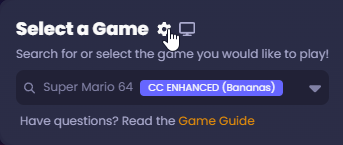
- You may not see this option until closer to the start of the event while we work on finalizing the pack and granting access!
- If you selected the wrong option or weren’t prompted, you can change your selection by clicking the settings cog ⚙️ next to Select a Game
- Select Lobby Setup then Join Lobby
- Enter the lobby code provided to you on the Discord
- Follow the usual steps to setup and launch the Project64 emulator and start your game session
- Note that the emulator can sometimes take minutes to load; killing it from the Task Manager and restarting it may help
- You should now be able to run around the castle grounds testing out effects! If you enter the castle, you should see Mario soon killed and returned to the castle until the start of the event (we’ll be counting down in the Discord!). Please feel free to run around while you wait!
- If you make any progress in the game prior to the beginning of the event, make sure to clear your save file before we start!
- Optional: You can drag and drop this URL onto OBS to display the current prize pool contributed by viewers.
Rules
To keep the competition fair, we have a few rules competitors must follow to be eligible to partake in the prize pool.
- Streaming Requirements
- You must livestream your perspective on the Twitch or YouTube account(s) linked to your Crowd Control account.
- Your livestream must be appropriate to restream on our primary broadcast; sexual or offensive imagery is not permitted.
- Gameplay Requirements
- You must not use emulator tools such as Save States or Fast Forward.
- You must be connected to the Crowd Control Lobby. If significant progress is made disconnected from the lobby, you may be penalized or disqualified.
- For Super Mario 64 (Sept 2025):
- You must start at the castle ground with a clean save file
- You must obtain 50 stars (no need to beat the game)
Additionally, by participating in the event you agree to these terms:
- Prize Distribution: Cash prizes will be awarded to the first 10 participants to complete the challenge. Prizes are funded using 50% of the revenue from coin purchases on competitors’ streams. Payments will be processed via Crowd Control. It is the creator’s responsibility to complete onboarding and provide accurate payment details within the Crowd Control app.
- Use of Likeness: By participating in this event, you grant Crowd Control the right to use your likeness, including but not limited to clips, VODs, screenshots, and highlights, for the purposes of advertising, promotion, and marketing related to Lobby Royale.
- We reserve the right to disqualify players for inappropriate or unfair behavior as we see fit.