

Crowd Control Setup Guides
CC Setup Guides
Account Linking
Account Linking enables you to connect multiple logins to the same Crowd Control account. This is useful for enabling platform-exclusive features such as the Twitch extension or TikTok LIVE triggers.
To begin linking accounts, please first ensure that you are logged in to the Crowd Control desktop application with your primary account. This will be whatever account you have previously used to purchase a subscription, purchased coins as a viewer, or received effects from viewers. If you’re unsure which account if any you’ve used before, a good rule of thumb is to pick whichever account has data available in the Sessions menu of the app. If you’re still unsure, we recommend logging in with one of our platforms that offer extra features, which currently includes just Twitch or TikTok.
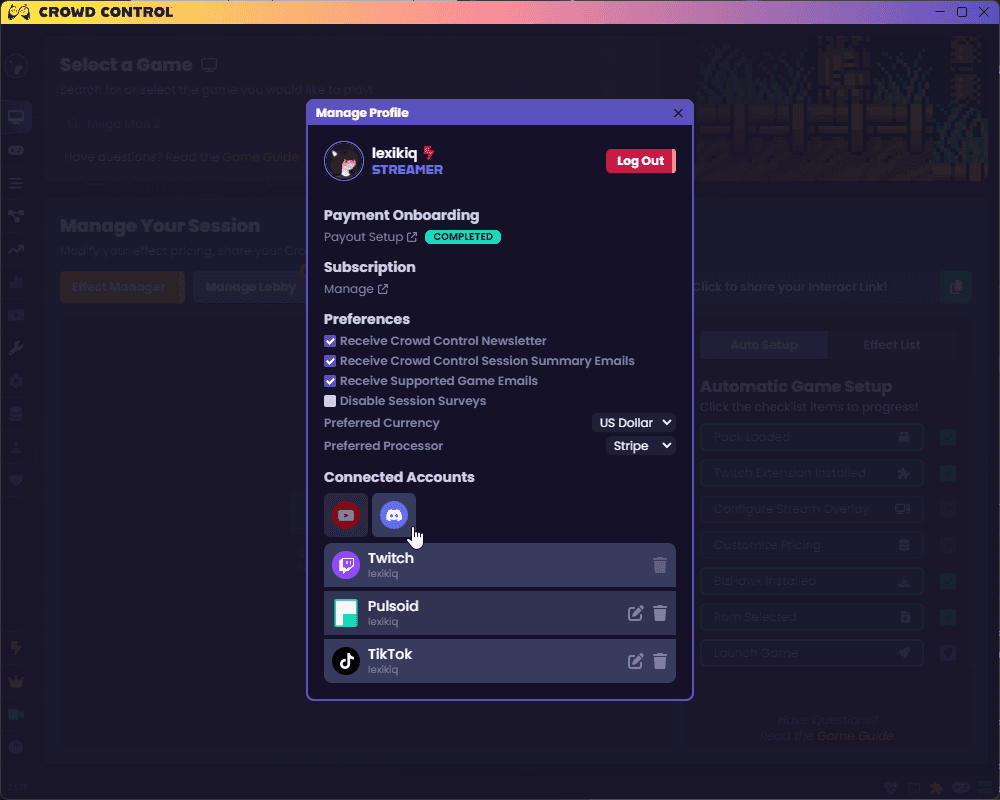
Once you’ve logged in with your primary account, you can begin linking other logins from the Manage Profile tab of the Crowd Control desktop app. If you are having issues linking an account, please ensure you have followed the above instructions to login to your primary account. If you continue to have issues linking a Twitch or TikTok account, please reach out to our support team on Discord and we may look into manually linking your accounts.
Account Linking enables you to connect multiple logins to the same Crowd Control account. This is useful for enabling platform-exclusive features such as the Twitch extension or TikTok LIVE triggers.
To begin linking accounts, please first ensure that you are logged in to the Crowd Control desktop application with your primary account. This will be whatever account you have previously used to purchase a subscription, purchased coins as a viewer, or received effects from viewers. If you’re unsure which account if any you’ve used before, a good rule of thumb is to pick whichever account has data available in the Sessions menu of the app. If you’re still unsure, we recommend logging in with one of our platforms that offer extra features, which currently includes just Twitch or TikTok.
Once you’ve logged in with your primary account, you can begin linking other logins from the Manage Profile tab of the Crowd Control desktop app. If you are having issues linking an account, please ensure you have followed the above instructions to login to your primary account. If you continue to have issues linking a Twitch or TikTok account, please reach out to our support team on Discord and we may look into manually linking your accounts.
Ready to get Started?
Start Streaming the Interactive Way
Have any Questions?
Check our FAQs, or join Discord for Support
Making a Game?
Consider integrating Crowd Control!
