Features

Resources

Features

Resources

Game box art
TetrisNES
No headings found on page

Crowd Control Setup Guides

CC Setup Guides

Getting Started

New to Crowd Control? Check out the

or check our

1. Start with the App

  • Open Crowd Control Desktop App

  • Select Tetris from the game list

  • Follow the Auto Setup checklist (left side of app)

2. ROM Requirements

We support the USA Version of Tetris. The base ROM should match MD5 of EC58574D96BEE8C8927884AE6E7A2508 or a checksum of 6D72C53A.

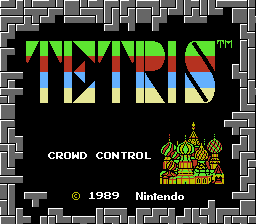
The ROM for this game gets patched as you hit start in the CC app. You can tell the patch has been applied correctly by this special title screen:

3. Test Before You Stream

  • You can only test effects after pressing “Start Session” in the Crowd Control app

  • Always test a few effects before going live to confirm effects trigger as expected

Skipping this step can lead to broken streams and confusion!

1. Start with the App

  • Open Crowd Control Desktop App

  • Select Tetris from the game list

  • Follow the Auto Setup checklist (left side of app)

2. ROM Requirements

We support the USA Version of Tetris. The base ROM should match MD5 of EC58574D96BEE8C8927884AE6E7A2508 or a checksum of 6D72C53A.

The ROM for this game gets patched as you hit start in the CC app. You can tell the patch has been applied correctly by this special title screen:

3. Test Before You Stream

  • You can only test effects after pressing “Start Session” in the Crowd Control app

  • Always test a few effects before going live to confirm effects trigger as expected

Skipping this step can lead to broken streams and confusion!

Ready to get Started?

Start Streaming the Interactive Way

Have any Questions?

Check our FAQs, or join Discord for Support

Making a Game?

Consider integrating Crowd Control!