

Crowd Control Setup Guides
CC Setup Guides
Rim World
Setup
Select “RimWorld” from the Crowd Control desktop app.
Install the mod using the CC app or from the Steam Workshop.
Launch Rim World using the CC app.
Enable mods and start Crowd Control in game.
Press START in the CC app and test effects!
Enable Mods and Connect to Crowd Control
After launching RimWorld, head to Mods on the title screen.
Confirm “RimWorld CrowdControl” and its requirements are enabled and “Auto-sort mods” if needed.
Press “Save and apply changes”.
Create a new colony or load game.
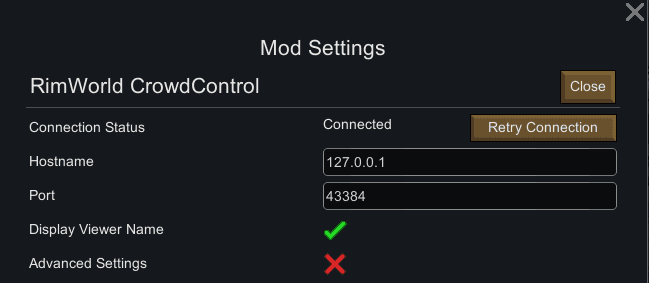
Once in game, go to Options > Mod Options > select “RimWorld CrowdControl” and make sure “Connection Status” is connected. Press Retry Connection if needed.
Mod Compatibility
Other mods may work with ours, but have not been tested. If you run into any issues, try with a clean profile. If you have issues with a mod, let us know and report to our Discord!
Mods that have reported issues/compatibility with Crowd Control:
Rimhammer - Can cause some effects to double. Maybe have other unstable features. GitHub Issue
Uninstall
To uninstall the Crowd Control mod:
From the CC desktop app, select your game.
Press ALT + Click on “Mod Installed” to run the uninstaller.
Credits
Thanks for helping us test this pack deputy7!
Our mod can be found on GitHub.
Our mod relies on HarmonyRimWorld & RimworldHugsLib
Setup
Select “RimWorld” from the Crowd Control desktop app.
Install the mod using the CC app or from the Steam Workshop.
Launch Rim World using the CC app.
Enable mods and start Crowd Control in game.
Press START in the CC app and test effects!
Enable Mods and Connect to Crowd Control
After launching RimWorld, head to Mods on the title screen.
Confirm “RimWorld CrowdControl” and its requirements are enabled and “Auto-sort mods” if needed.
Press “Save and apply changes”.
Create a new colony or load game.
Once in game, go to Options > Mod Options > select “RimWorld CrowdControl” and make sure “Connection Status” is connected. Press Retry Connection if needed.
Mod Compatibility
Other mods may work with ours, but have not been tested. If you run into any issues, try with a clean profile. If you have issues with a mod, let us know and report to our Discord!
Mods that have reported issues/compatibility with Crowd Control:
Rimhammer - Can cause some effects to double. Maybe have other unstable features. GitHub Issue
Uninstall
To uninstall the Crowd Control mod:
From the CC desktop app, select your game.
Press ALT + Click on “Mod Installed” to run the uninstaller.
Credits
Thanks for helping us test this pack deputy7!
Our mod can be found on GitHub.
Our mod relies on HarmonyRimWorld & RimworldHugsLib
Ready to get Started?
Start Streaming the Interactive Way
Have any Questions?
Check our FAQs, or join Discord for Support
Making a Game?
Consider integrating Crowd Control!
