



RimWorld
PC Apr 2024
-
 Mod Required
-
 Mod Compatibility: Good
-
 Automatic Setup: Full
-
 Auto Uninstaller
-
How to Setup Crowd Control with Steam
Guide
RimWorld (PC)
You can follow the general setup guide & FAQ above for extra help with the Twitch Extension, the Crowd Control Desktop Client and other options.
If you have any questions or need help with this setup, please head over to our discord for additional support!
Setup
- Select “RimWorld” from the Crowd Control desktop app.
- Install the mod using the CC app or from the Steam Workshop.
- If you use the workshop, for now, add the ccver file to your main install folder.
- Launch Rim World using the CC app.
- Enable mods and start Crowd Control in game.
- Press START in the CC app and test effects!
Enable Mods and Connect to Crowd Control
- After launching RimWorld, head to Mods on the title screen.
- Confirm “RimWorld CrowdControl” and its requirements are enabled and “Auto-sort mods” if needed.
- Press “Save and apply changes”.
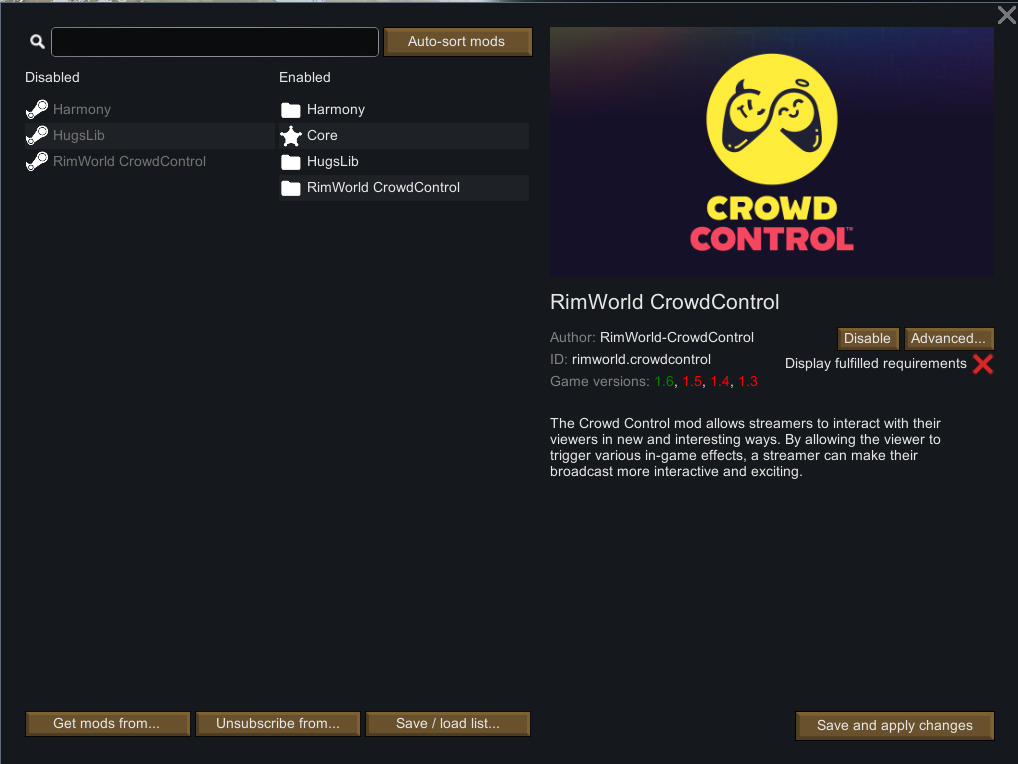
- Create a new colony or load game.
- Once in game, go to Options > Mod Options > select “RimWorld CrowdControl” and make sure “Connection Status” is connected. Press Retry Connection if needed.

Mod Compatibility
Other mods may work with ours, but have not been tested. If you run into any issues, try with a clean profile. If you have issues with a mod, let us know and report to our Discord!
Mods that have reported issues/compatibility with Crowd Control:
Rimhammer – Can cause some effects to double. Maybe have other unstable features. GitHub Issue
Uninstall
To uninstall the Crowd Control mod:
- From the CC desktop app, select your game.
- Press ALT + Click on “Mod Installed” to run the uninstaller.
Credits
Thanks for helping us test this pack deputy7!
Our mod can be found on GitHub.
Our mod relies on HarmonyRimWorld & RimworldHugsLib