

Raft
PC Jan 2023
-
 Mod Required
-
 Mod Compatibility: Good
-
 Multiplayer: Good
-
 Automatic Setup: Full
-
 Auto Uninstaller
-
How to Setup Crowd Control with Steam
Guide
Raft (PC)
Install the Crowd Control Desktop App and follow the General Setup Guide
Need help? Reach out via Discord or check the FAQ
Automatic Setup
You may need to run the game at least once before installing mods!
- Select “Raft ” from the CC desktop app.
- Use the CC app to automatically install the Raft Mod Loader + our mod.
- Launch the game using the CC desktop app.
- Enable the Crowd Control mod from the Raft Mod Loader by clicking the “plug” icon.
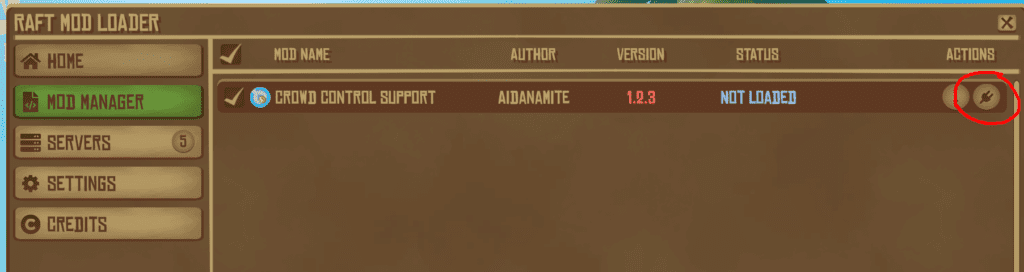 The “STATUS” should change to “RUNNING…” after activation.
- You should now be able to press START in the CC app and test effects!
Multiplayer
This mod was designed to be used with friends! All players should have the mod installed and activated. Please note that some cosmetic effects such as Big Waves or Break Random may not be synchronized across all players.
Antivirus
If you have any issues with Windows BitDefender or other anti-virus tools when trying to use the Raft Mod Loader, you can check out their guide about creating exceptions for the software. How to configure your antivirus – Raft Modding The software itself is safe, just due to the nature of how it works, it can be known to cause false positives in anti-virus type software.
Uninstall
To uninstall the Crowd Control mod:
- From the CC desktop app, select your game.
- Click the trash icon 🗑️ next to “Mod Installed” to run the uninstaller.
Credits
This mod was created by Aidanamite, more info at https://www.raftmodding.com/mods/crowd-control-support