



R.E.P.O.
PC Nov 2025
-
 Mod Required
-
 Mod Compatibility: Good
-
 Multiplayer: Good
-
 Automatic Setup: Full
-
 Thunderstore Integration
-
 Auto Uninstaller
-
How to Setup Crowd Control with Thunderstore
-
How to Setup Crowd Control with Steam
Guide
R.E.P.O. (PC)
You can follow the general setup guide & FAQ above for extra help with the Twitch Extension, the Crowd Control Desktop Client and other options.
If you have any questions or need help with this setup, please head over to our discord for additional support!
Please suggest new effects in our discord under #cc-requests!
Setup
We do not support the “beta” Steam branch at this time.
- Select “R.E.P.O.” from the CC desktop app.
- Install the mod using our desktop app.
- Or your Thunderstore mod loader.
- Launch the game using the CC desktop app.
- Or your Thunderstore mod loader.
- Press START and test effects!
Only Multiplayer is supported at this time. If you want to play alone, don’t invite anyone to your multiplayer session!
You can find the full BepInEx + CC mod package here!
Multiplayer
- The host of the lobby must have the mod installed for the mod to be usable, else all effects will queue and refund.
- We highly suggest everyone in the lobby install the mod as well (the mod is free to download on Thunderstore, see above). This will enable effects with custom content such as Hype Trains and bread, and allow other players to receive “Random Teammate” effects. 🚂🍞
- Anyone with the mod installed can also start their own independent Crowd Control session on their own channel.
Thunderstore
Our mod can be found here: https://thunderstore.io/c/repo/p/CrowdControl/CrowdControl_REPO/
Extra Mod Settings
Using the “MODS” option from the title screen, you can edit some basic settings for Crowd Control. A restart of the game will be required after changing settings.
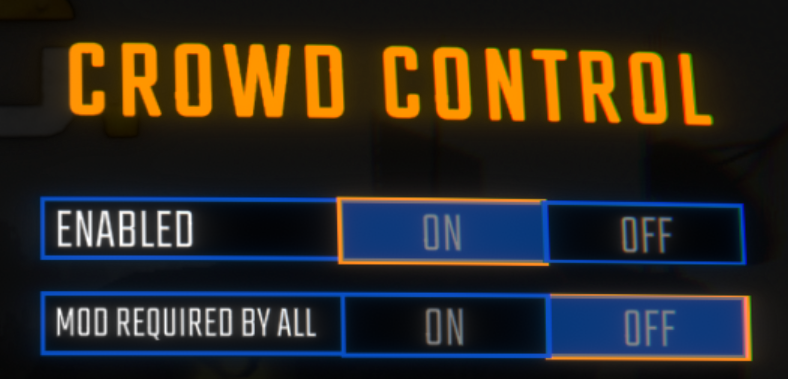
- If someone joins your game without the mod, and “Mod required by all” is ON, the game will not load!
- Custom items and effects will only be seen by players with the mod, like Hype Trains and bread. 🚂🍞
- These items will be removed from your extension automatically.
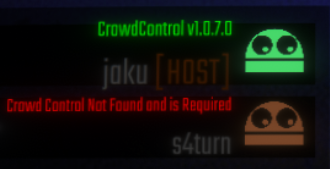
- You can tell someone doesn’t have the mod from the Multiplayer Lobby:
Mod Compatibility
Our mod was made using the BepInEx.
Other mods may work with ours, but have not been tested. If you run into any issues, try with a clean profile. If you have issues with a mod, let us know!
Mods that have reported issues/compatibility with Crowd Control:
None reported yet…
Uninstall
To uninstall the Crowd Control mod and BepInEx:
- From the CC desktop app, select your game.
- Press ALT + Click on “Mod Installed” to run the uninstaller.
NOTE: This only works if you previously used “Skip Mod Manager”.
Credits
Our mod requires and depends on: