

Guide
Pokemon FireRed (GBA)
Support
You can follow the general setup guide at https://crowdcontrol.live/setup for extra help with the Twitch Extension, the Crowd Control Desktop Client and other options.
If you have any questions or need help with this setup, please head over to our discord or email us for additional support!
Setup
- Select “Pokemon FireRed” from the CC desktop app.
- Install Bizhawk using our desktop app.
- Select your ROM that matches our supported version.
- Launch the game using the CC desktop app.
- Press START and test effects!
Version Support
We support the USA/EU version of Pokemon FireRed, v 1.1 or Rev1, for the GameBoy Advanced. The base ROM should match MD5 51901a6e40661b3914aa333c802e24e8.
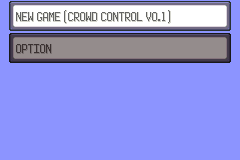
The game automatically gets patched when you launch the game using Crowd Control. The title screen and NEW GAME menu will reflect this.
Randomizer
Updates have been made that should make randomizer support for stable! You can find that here: https://github.com/Ajarmar/universal-pokemon-randomizer-zx. Please continue to use the “Report Bug” button if you find any issues and mentioned randomizer!
Gameplay notes
- Give Pokemon – These Pokemon are considered to be from another trainer. You can even see who gave it to you in the Pokemon Summary. Since these are from another trainer, badges will be required to control them and they will receive extra exp from battles.
- Pokedex – To allow giving you Pokemon at the beginning of the game, we automatically give you a Pokedex. This may cause issues down the line, when trying to “become Champion. This is something we are reviewing!