

Crowd Control Setup Guides
CC Setup Guides
Twitch Charity Mode
Together for Good - Supported from November 17th, 2025 to December 2nd, 2025!
How to connect your Twitch Charity to Crowd Control
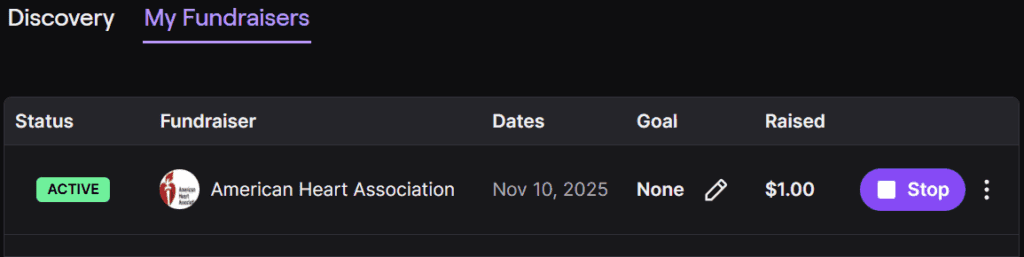
Make sure you have a charity created and activate on the Twitch Charity Dashboard.
If you have an active charity it should look like the screenshot below.
From there, in your Crowd Control application, on the left-hand sidebar, click Config and then Charity.
Select the Twitch Charity option, and then click the Link Charity button.

After that you’re all set, any donations made to your campaign while it’s linked to Crowd Control will provide the donator 1 Crowd Control Coin for every $0.01 donated.
Troubleshooting
You cannot link a charity with an active Crowd Control session, so make sure your session is not started.
Disabling your campaign on the Twitch Charity page will stop any active session you may have with Crowd Control. We recommend stopping your session first.
Reminder that this is a limited time event good until end of December 2nd, 2025.
Some Notes
Crowd Control does not receive a portion of the donations, we are foregoing our 20% cut that we would normally receive when used with Bits when a charity is enabled.
Donations be made through Donate to Charity button. They cannot donate from a link in chat.
Donations made will credit the donator with coins which exchange at $0.01 to 1, so for every cent donated they will receive 1 Crowd Control coin, or $1.00 = 100 coins.
Unlike the Tiltify support your campaign is unique to you, other streamers cannot join the same campaign and so coin balances are limited to your campaigns.
Don’t forget to adjust your prices to better compliment your stream and community!
Support
If you have any questions, issues or comments, feel free to ask at our discord. Have fun!
Together for Good - Supported from November 17th, 2025 to December 2nd, 2025!
How to connect your Twitch Charity to Crowd Control
Make sure you have a charity created and activate on the Twitch Charity Dashboard.
If you have an active charity it should look like the screenshot below.
From there, in your Crowd Control application, on the left-hand sidebar, click Config and then Charity.
Select the Twitch Charity option, and then click the Link Charity button.
After that you’re all set, any donations made to your campaign while it’s linked to Crowd Control will provide the donator 1 Crowd Control Coin for every $0.01 donated.
Troubleshooting
You cannot link a charity with an active Crowd Control session, so make sure your session is not started.
Disabling your campaign on the Twitch Charity page will stop any active session you may have with Crowd Control. We recommend stopping your session first.
Reminder that this is a limited time event good until end of December 2nd, 2025.
Some Notes
Crowd Control does not receive a portion of the donations, we are foregoing our 20% cut that we would normally receive when used with Bits when a charity is enabled.
Donations be made through Donate to Charity button. They cannot donate from a link in chat.
Donations made will credit the donator with coins which exchange at $0.01 to 1, so for every cent donated they will receive 1 Crowd Control coin, or $1.00 = 100 coins.
Unlike the Tiltify support your campaign is unique to you, other streamers cannot join the same campaign and so coin balances are limited to your campaigns.
Don’t forget to adjust your prices to better compliment your stream and community!
Support
If you have any questions, issues or comments, feel free to ask at our discord. Have fun!
Ready to get Started?
Start Streaming the Interactive Way
Have any Questions?
Check our FAQs, or join Discord for Support
Making a Game?
Consider integrating Crowd Control!
