
Crowd Control Setup Guides
CC Setup Guides
Terraria
1. Start with the App
We support Steam and other versions. Our mod requires tModLoader!
Open Crowd Control Desktop App
Select Terraria from the game list
Follow the Auto Setup checklist (right side of app)
See Steam or GOG/Other setup below for more info.
STEAM
Install Terraria
Install tModLoader
Install the Crowd Control mod on the Steam Workshop
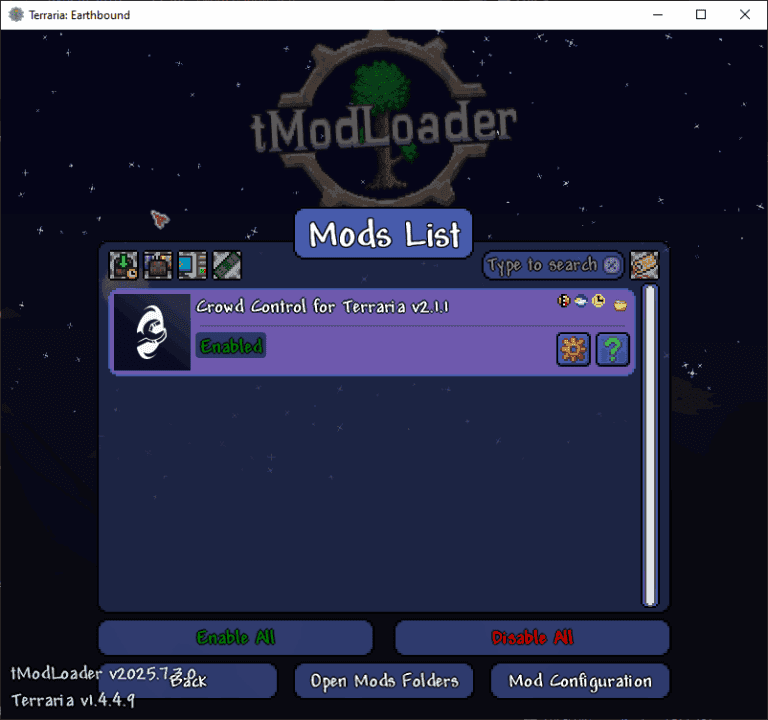
Make sure our mod is enabled! Go to Workshop > Manage Mods.
GOG/Other
Install Terraria from your game store
Install tModLoader
In the CC app, select your tModLoader install location
Use the CC app to install the mod
Make sure our mod is enabled! Go to Workshop > Manage Mods.
2. Test Before You Stream
You can only test effects after pressing “Start Session” in the Crowd Control app
Always test a few effects before going live to confirm effects trigger as expected
Skipping this step can lead to broken streams and confusion!
Gameplay notes
Some spawn boss effects are disabled by default! This is to help balance things out as you progress and help prevent end game bosses spawn on top of a fresh character. Make sure to enable spawns from the CC app Effect Manager.
The mod also has a good amount of settings to review based on your play style. Check it while in game from Settings > Mod Configuration > Crowd Control for Terraria.
Multiplayer server are also supported and highly suggested! Make sure each player has the same Mod Config settings set!
Mod Compatibility
Other mods may work, but have not been tested with Crowd Control.
If you have issues, try with just Crowd Control.
If you find a mod that causes issues, let us know!
Reported Issues:
Calamity Mod
Credits
Thanks David F for creating this mod! This mod can be found on GitHub!
Thanks to all the contributors of the tModLoader project!
Thanks Re-Logic for being cool.
1. Start with the App
We support Steam and other versions. Our mod requires tModLoader!
Open Crowd Control Desktop App
Select Terraria from the game list
Follow the Auto Setup checklist (right side of app)
See Steam or GOG/Other setup below for more info.
STEAM
Install Terraria
Install tModLoader
Install the Crowd Control mod on the Steam Workshop
Make sure our mod is enabled! Go to Workshop > Manage Mods.
GOG/Other
Install Terraria from your game store
Install tModLoader
In the CC app, select your tModLoader install location
Use the CC app to install the mod
Make sure our mod is enabled! Go to Workshop > Manage Mods.
2. Test Before You Stream
You can only test effects after pressing “Start Session” in the Crowd Control app
Always test a few effects before going live to confirm effects trigger as expected
Skipping this step can lead to broken streams and confusion!
Gameplay notes
Some spawn boss effects are disabled by default! This is to help balance things out as you progress and help prevent end game bosses spawn on top of a fresh character. Make sure to enable spawns from the CC app Effect Manager.
The mod also has a good amount of settings to review based on your play style. Check it while in game from Settings > Mod Configuration > Crowd Control for Terraria.
Multiplayer server are also supported and highly suggested! Make sure each player has the same Mod Config settings set!
Mod Compatibility
Other mods may work, but have not been tested with Crowd Control.
If you have issues, try with just Crowd Control.
If you find a mod that causes issues, let us know!
Reported Issues:
Calamity Mod
Credits
Thanks David F for creating this mod! This mod can be found on GitHub!
Thanks to all the contributors of the tModLoader project!
Thanks Re-Logic for being cool.
Ready to get Started?
Start Streaming the Interactive Way
Have any Questions?
Check our FAQs, or join Discord for Support
Making a Game?
Consider integrating Crowd Control!
