
Crowd Control Setup Guides
CC Setup Guides
Stardew Valley
Automatic Setup
We suggest using the Crowd Control Desktop app to install our mod!
Select Stardew Valley from the CC desktop app.
Select the installed Game Path.
Steam: This should auto-select the path for you!
Other: Point the CC app to your “Stardew Valley” install folder
Install the mod using our desktop app.
Follow the extra installer window to install SMAPI
Launch the game using the CC desktop app.
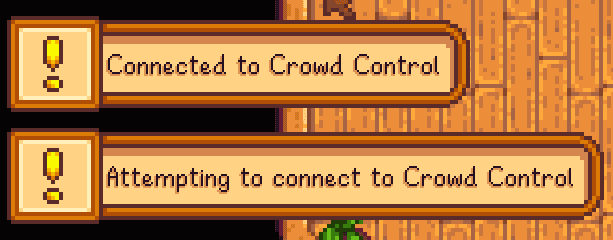
Load a save to proceed. You should see the message like shown below.
Press START and test effects!
Manual Setup
If you want to apply the mod yourself, feel free to follow these steps.
We use the SMAPI mod loader to allow effects to work. If you do not already have SMAPI installed, grab the latest installer from their site.
More info can be found at https://stardewvalleywiki.com/Modding:Player_Guide/Getting_Started
Download and install SMAPI
Download our latest mod CrowdControl-StardewValley.zip
Extract the contents of
ControlValley.zipinto your SMAPI Mods folder.Download the ccver and place it in the main Startdew Valley install directory.
Select Stardew Valley from the CC desktop app.
Select the install Startdew Valley install Game Path.
Launch the game using the CC desktop app (which will execute
StardewModdingAPI.exe)Press START and test effects!
Gameplay Support
When you load into a game, you should see these messages!
Softlocked? The fact is, we are doing some things the developer did not intend. If you get soft locked or stuck in some way, resetting the day should fix most issues. Just exit to the title screen and reload to restart the day!
Multiplayer? Multiplayer works! Some effects may act slightly different or only be seen by one player, like emotes.
Uninstall
To uninstall the Crowd Control mod:
From the CC desktop app, select your game.
Click the trash icon 🗑️ next to “Mod Installed” to run the uninstaller.
Credits
Originally developed for Crowd Control by tesla !
Automatic Setup
We suggest using the Crowd Control Desktop app to install our mod!
Select Stardew Valley from the CC desktop app.
Select the installed Game Path.
Steam: This should auto-select the path for you!
Other: Point the CC app to your “Stardew Valley” install folder
Install the mod using our desktop app.
Follow the extra installer window to install SMAPI
Launch the game using the CC desktop app.
Load a save to proceed. You should see the message like shown below.
Press START and test effects!
Manual Setup
If you want to apply the mod yourself, feel free to follow these steps.
We use the SMAPI mod loader to allow effects to work. If you do not already have SMAPI installed, grab the latest installer from their site.
More info can be found at https://stardewvalleywiki.com/Modding:Player_Guide/Getting_Started
Download and install SMAPI
Download our latest mod CrowdControl-StardewValley.zip
Extract the contents of
ControlValley.zipinto your SMAPI Mods folder.Download the ccver and place it in the main Startdew Valley install directory.
Select Stardew Valley from the CC desktop app.
Select the install Startdew Valley install Game Path.
Launch the game using the CC desktop app (which will execute
StardewModdingAPI.exe)Press START and test effects!
Gameplay Support
When you load into a game, you should see these messages!
Softlocked? The fact is, we are doing some things the developer did not intend. If you get soft locked or stuck in some way, resetting the day should fix most issues. Just exit to the title screen and reload to restart the day!
Multiplayer? Multiplayer works! Some effects may act slightly different or only be seen by one player, like emotes.
Uninstall
To uninstall the Crowd Control mod:
From the CC desktop app, select your game.
Click the trash icon 🗑️ next to “Mod Installed” to run the uninstaller.
Credits
Originally developed for Crowd Control by tesla !
Ready to get Started?
Start Streaming the Interactive Way
Have any Questions?
Check our FAQs, or join Discord for Support
Making a Game?
Consider integrating Crowd Control!
