

Crowd Control Setup Guides
CC Setup Guides
Resident Evil 4 Remake
1. Start with the App
Open Crowd Control Desktop App
Select Resident Evil 4 from the game list
Select the pack:
Latest: More stable, more effects.
Legacy: Less stable and will be removed soon.
Follow the Auto Setup checklist (right side of app)
2. Test Before You Stream
You can only test effects after pressing “Start Session” in the Crowd Control app
Always test a few effects before going live to confirm effects trigger as expected
Skipping this step can lead to broken streams and confusion!
Mod Compatibility
Our mod is built using REFramework
Our “Legacy” builds are using Lua and may be more compatible with other mods. We will be removing the legacy build soon.
Our mod packages:
Other mods may work, but have not been tested with Crowd Control.
If you have issues, try with just Crowd Control.
Dodge Roll and Sprint: Will need to be loaded manually if using the “Latest” build of our mod.
If you find a mod that causes issues, let us know!
Mod Options
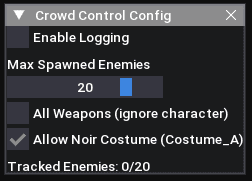
Our “Latest” version of the mod has extra options. Press the INSERT key to open the menu in game.
Common Issues
Awaiting Connector: You may need to install .NET 8.0, found here: .NET 8.0 Desktop Runtime (v8.0.23) - Windows x64
Game Version
Our support has been tested with the Steam version of the game. Other game stores may work but have not been tested.
Looking for another game store? Submit a request to our Discord, #cc-requests.
Uninstall
To uninstall the Crowd Control mod:
From the CC desktop app, select your game.
Click the trash icon 🗑️ next to “Mod Installed” to run the uninstaller.
Credits
Thanks to the RE Framework contributors for making mods with these games possible! Find more info on the project here: https://github.com/praydog/REFramework
1. Start with the App
Open Crowd Control Desktop App
Select Resident Evil 4 from the game list
Select the pack:
Latest: More stable, more effects.
Legacy: Less stable and will be removed soon.
Follow the Auto Setup checklist (right side of app)
2. Test Before You Stream
You can only test effects after pressing “Start Session” in the Crowd Control app
Always test a few effects before going live to confirm effects trigger as expected
Skipping this step can lead to broken streams and confusion!
Mod Compatibility
Our mod is built using REFramework
Our “Legacy” builds are using Lua and may be more compatible with other mods. We will be removing the legacy build soon.
Our mod packages:
Other mods may work, but have not been tested with Crowd Control.
If you have issues, try with just Crowd Control.
Dodge Roll and Sprint: Will need to be loaded manually if using the “Latest” build of our mod.
If you find a mod that causes issues, let us know!
Mod Options
Our “Latest” version of the mod has extra options. Press the INSERT key to open the menu in game.
Common Issues
Awaiting Connector: You may need to install .NET 8.0, found here: .NET 8.0 Desktop Runtime (v8.0.23) - Windows x64
Game Version
Our support has been tested with the Steam version of the game. Other game stores may work but have not been tested.
Looking for another game store? Submit a request to our Discord, #cc-requests.
Uninstall
To uninstall the Crowd Control mod:
From the CC desktop app, select your game.
Click the trash icon 🗑️ next to “Mod Installed” to run the uninstaller.
Credits
Thanks to the RE Framework contributors for making mods with these games possible! Find more info on the project here: https://github.com/praydog/REFramework
Ready to get Started?
Start Streaming the Interactive Way
Have any Questions?
Check our FAQs, or join Discord for Support
Making a Game?
Consider integrating Crowd Control!
