

Crowd Control Setup Guides
CC Setup Guides
REPO
Please suggest new effects in our discord under #cc-requests!
Setup
We do not support the “beta” Steam branch at this time.
Select “R.E.P.O.” from the CC desktop app.
Install the mod using our desktop app.
Launch the game using the CC desktop app.
Press START and test effects!
Only Multiplayer is supported at this time. If you want to play alone, don’t invite anyone to your multiplayer session!
You can find the full BepInEx + CC mod package here!
Multiplayer
The host of the lobby must have the mod installed for the mod to be usable, else all effects will queue and refund.
We highly suggest everyone in the lobby install the mod as well (the mod is free to download on Thunderstore, see above). This will enable effects with custom content such as Hype Trains and bread, and allow other players to receive “Random Teammate” effects. 🚂🍞
Anyone with the mod installed can also start their own independent Crowd Control session on their own channel.
Thunderstore
Our mod can be found here: https://thunderstore.io/c/repo/p/CrowdControl/CrowdControl_REPO/
Extra Mod Settings
Using the “MODS” option from the title screen, you can edit some basic settings for Crowd Control. A restart of the game will be required after changing settings.
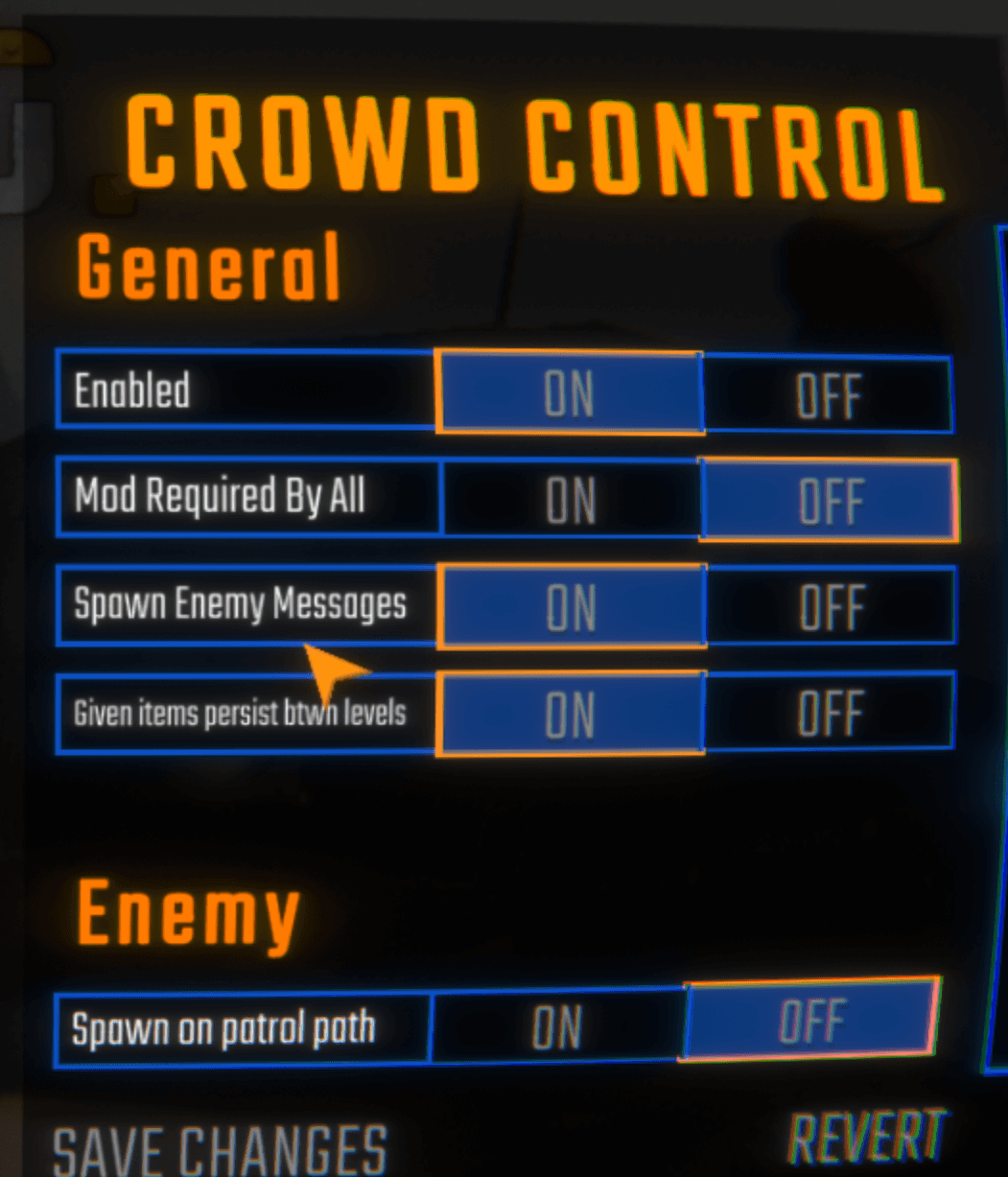
If someone joins your game without the mod, and “Mod required by all” is ON, the game will not load!
Custom items and effects will only be seen by players with the mod, like Hype Trains and bread. 🚂🍞
These items will be removed from your extension automatically.
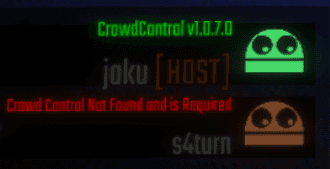
You can tell someone doesn’t have the mod from the Multiplayer Lobby:
Mod Compatibility
Our mod was made using the BepInEx.
Other mods may work with ours, but have not been tested. If you run into any issues, try with a clean profile. If you have issues with a mod, let us know!
Game Version
Our support has been tested with the Steam version of the game. Other game stores may work but have not been tested.
Looking for another game store? Submit a request to our Discord, #cc-requests.
Uninstall
To uninstall the Crowd Control mod:
From the CC desktop app, select your game.
Click the trash icon 🗑️ next to “Mod Installed” to run the uninstaller.
This only works if you previously used “Skip Mod Manager”.
Credits
Our mod requires and depends on:
Please suggest new effects in our discord under #cc-requests!
Setup
We do not support the “beta” Steam branch at this time.
Select “R.E.P.O.” from the CC desktop app.
Install the mod using our desktop app.
Launch the game using the CC desktop app.
Press START and test effects!
Only Multiplayer is supported at this time. If you want to play alone, don’t invite anyone to your multiplayer session!
You can find the full BepInEx + CC mod package here!
Multiplayer
The host of the lobby must have the mod installed for the mod to be usable, else all effects will queue and refund.
We highly suggest everyone in the lobby install the mod as well (the mod is free to download on Thunderstore, see above). This will enable effects with custom content such as Hype Trains and bread, and allow other players to receive “Random Teammate” effects. 🚂🍞
Anyone with the mod installed can also start their own independent Crowd Control session on their own channel.
Thunderstore
Our mod can be found here: https://thunderstore.io/c/repo/p/CrowdControl/CrowdControl_REPO/
Extra Mod Settings
Using the “MODS” option from the title screen, you can edit some basic settings for Crowd Control. A restart of the game will be required after changing settings.
If someone joins your game without the mod, and “Mod required by all” is ON, the game will not load!
Custom items and effects will only be seen by players with the mod, like Hype Trains and bread. 🚂🍞
These items will be removed from your extension automatically.
You can tell someone doesn’t have the mod from the Multiplayer Lobby:
Mod Compatibility
Our mod was made using the BepInEx.
Other mods may work with ours, but have not been tested. If you run into any issues, try with a clean profile. If you have issues with a mod, let us know!
Game Version
Our support has been tested with the Steam version of the game. Other game stores may work but have not been tested.
Looking for another game store? Submit a request to our Discord, #cc-requests.
Uninstall
To uninstall the Crowd Control mod:
From the CC desktop app, select your game.
Click the trash icon 🗑️ next to “Mod Installed” to run the uninstaller.
This only works if you previously used “Skip Mod Manager”.
Credits
Our mod requires and depends on:
Ready to get Started?
Start Streaming the Interactive Way
Have any Questions?
Check our FAQs, or join Discord for Support
Making a Game?
Consider integrating Crowd Control!
