

Crowd Control Setup Guides
CC Setup Guides
Pokemon Fire Red
Setup
Select “Pokemon FireRed” from the CC desktop app.
Install Bizhawk using our desktop app.
Select your ROM that matches our supported version.
Launch the game using the CC desktop app.
Press START and test effects!
Version Support
We support the USA/EU version of Pokemon FireRed, v 1.1 or Rev1, for the GameBoy Advanced. The base ROM should match MD5 51901a6e40661b3914aa333c802e24e8.
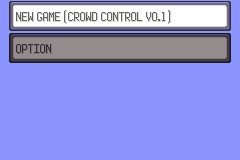
The game automatically gets patched when you launch the game using Crowd Control. The title screen and NEW GAME menu will reflect this.
Randomizer
Updates have been made that should make randomizer support for stable! You can find that here: https://github.com/Ajarmar/universal-pokemon-randomizer-zx. Please continue to use the “Report Bug” button if you find any issues and mentioned randomizer!
Gameplay notes
Give Pokemon - These Pokemon are considered to be from another trainer. You can even see who gave it to you in the Pokemon Summary. Since these are from another trainer, badges will be required to control them and they will receive extra exp from battles.
To enter the Elite Four, use the admin effect in the CC app “Restore Pokedex”.
From the CC app, under Test Effects, click the wrench icon.
Send Restore Pokedex.
Leave the room and reenter.
Setup
Select “Pokemon FireRed” from the CC desktop app.
Install Bizhawk using our desktop app.
Select your ROM that matches our supported version.
Launch the game using the CC desktop app.
Press START and test effects!
Version Support
We support the USA/EU version of Pokemon FireRed, v 1.1 or Rev1, for the GameBoy Advanced. The base ROM should match MD5 51901a6e40661b3914aa333c802e24e8.
The game automatically gets patched when you launch the game using Crowd Control. The title screen and NEW GAME menu will reflect this.
Randomizer
Updates have been made that should make randomizer support for stable! You can find that here: https://github.com/Ajarmar/universal-pokemon-randomizer-zx. Please continue to use the “Report Bug” button if you find any issues and mentioned randomizer!
Gameplay notes
Give Pokemon - These Pokemon are considered to be from another trainer. You can even see who gave it to you in the Pokemon Summary. Since these are from another trainer, badges will be required to control them and they will receive extra exp from battles.
To enter the Elite Four, use the admin effect in the CC app “Restore Pokedex”.
From the CC app, under Test Effects, click the wrench icon.
Send Restore Pokedex.
Leave the room and reenter.
Ready to get Started?
Start Streaming the Interactive Way
Have any Questions?
Check our FAQs, or join Discord for Support
Making a Game?
Consider integrating Crowd Control!
