
Crowd Control Setup Guides
CC Setup Guides
Hollow Knight
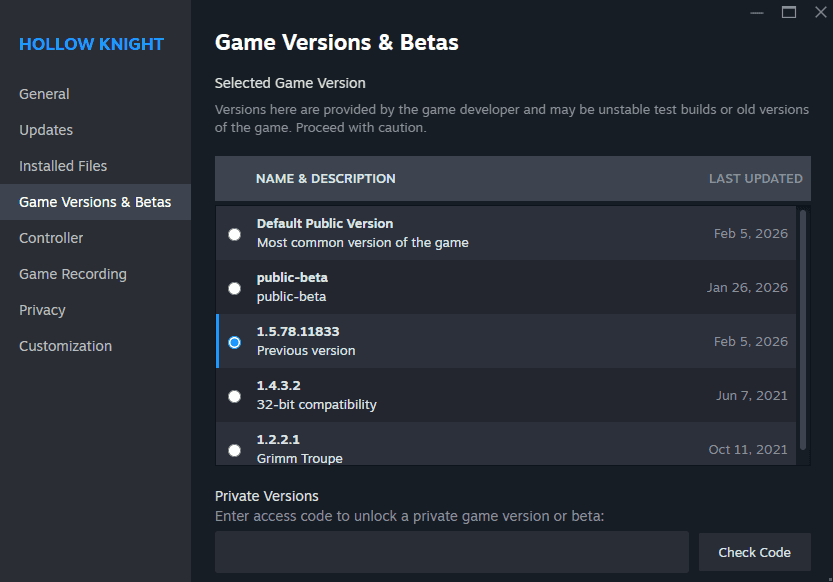
Feb 5, 2026 (Patch Version 1.5.12459): This latest patch is not compatible with our mod. For now, please use the Steam branch for 1.5.78.11833 (Previous version).
Setup
Select “Hollow Knight” from the CC desktop app.
Install the mod using our desktop app.
Launch the game using the CC desktop app.
The title screen will show “Modding API” and “Crowd Control”
Press START and test effects!
You can find our mod package here!
Uninstall
To uninstall the Crowd Control mod:
From the CC desktop app, select your game.
Click the trash icon 🗑️ next to “Mod Installed” to run the uninstaller.
You may need to “Verify” game files
Steam: right click Hollow Knight > Properties > Installed Files > Verify
Credits
Thanks to the Hollow Knight modding community! This Crowd Control version of Hollow Knight is based on the original HKTwitch mod.
Our version offers extra features not found in the current HKTwitch mod that you come to expect with Crowd Control. Effects will pause and resume when in certain states of the game that would otherwise continue to run. Auto-refund users when effects fail to trigger. And allow easy to use customization of prices and disabling of effects. While also giving you the benefit of using the Crowd Control extension.
Feb 5, 2026 (Patch Version 1.5.12459): This latest patch is not compatible with our mod. For now, please use the Steam branch for 1.5.78.11833 (Previous version).
Setup
Select “Hollow Knight” from the CC desktop app.
Install the mod using our desktop app.
Launch the game using the CC desktop app.
The title screen will show “Modding API” and “Crowd Control”
Press START and test effects!
You can find our mod package here!
Uninstall
To uninstall the Crowd Control mod:
From the CC desktop app, select your game.
Click the trash icon 🗑️ next to “Mod Installed” to run the uninstaller.
You may need to “Verify” game files
Steam: right click Hollow Knight > Properties > Installed Files > Verify
Credits
Thanks to the Hollow Knight modding community! This Crowd Control version of Hollow Knight is based on the original HKTwitch mod.
Our version offers extra features not found in the current HKTwitch mod that you come to expect with Crowd Control. Effects will pause and resume when in certain states of the game that would otherwise continue to run. Auto-refund users when effects fail to trigger. And allow easy to use customization of prices and disabling of effects. While also giving you the benefit of using the Crowd Control extension.
Ready to get Started?
Start Streaming the Interactive Way
Have any Questions?
Check our FAQs, or join Discord for Support
Making a Game?
Consider integrating Crowd Control!
