

Crowd Control Setup Guides
CC Setup Guides
Getting Paid
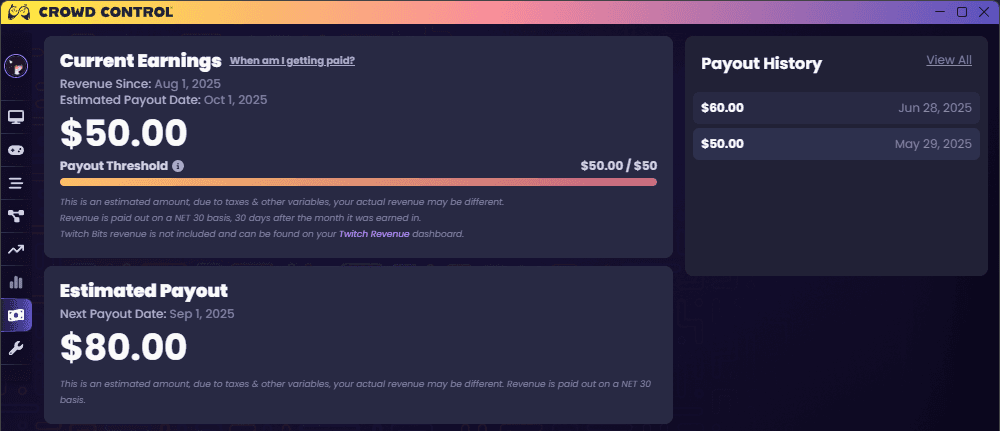
An image of the Analytics Overview tab of the app displaying a streamer who earned $80 in the previous month which is scheduled to be paid out towards the end of the current month, and additionally earned $50 in the current month scheduled to be paid out towards the end of the next month.
Step 1: Earning your first payment
On the Analytics Overview tab of the Crowd Control desktop app, you can view your Current Earnings on the top. The large number on the top shows your earnings this month, while the bar and figure on the right shows your accumulated earnings carried over across months. If that latter figure reads ≥$50: congratulations, it’s time to onboard!
Step 2: Onboarding
From the Overview or Manage Profile tabs of the app, click the Onboarding button. This will take you to our payout processor Tipalti to fill out your banking and tax information. You can elect to receive your payout through ACH/direct deposit, eCheck/local bank, PayPal, or check. Note that each method will impose different processing times and fees.
Step 3: Estimated Payout
Once you’re successfully onboarded with ≥$50 in revenue pending, the Analytics Overview tab of the app should now display when you can expect to receive this payment. It’s calculated per the NET 30 standard, and you’re free to check our math:
Figure out the date you became eligible to be paid out. For example, if you hit $50 on June 5th then onboarded on June 7th, your date is June 7th.
Find the last date in that month. In our example, that would be June 30th.
Add 30 days. In our example, that would be July 30th.
Step 4: Payout Processing
The time has come to be paid out! While we submit payouts for processing a few days early, the exact date you receive it will vary depending on your selected payout method, nearby weekends or holidays, etc.
Payout Method | Timing From Submission Date |
|---|---|
ACH | 3-5 Days |
eCheck/Local Bank | 1-4 Days |
PayPal | 1-2 Days |
Check | 1-2 Weeks |
Step 5: Future Payouts
Throughout this process, you may have made further revenue on the platform! Please note that, while we only require you to onboard once, you must still have ≥$50 pending at the end of each month in the UTC timezone for that revenue to move from Current Earnings to Estimated Payout (and later get paid out). If you have less than that amount, then your pending revenue will carry over to the next month until you hit the threshold again.
FAQs
Why don’t I see the revenue from my Twitch viewers?
The Analytics Overview tab of the app represents a completely separate monetization system than the one used by Twitch. Viewers interacting through our Twitch extension use Twitch Bits to purchase coins. This transaction is handled by Twitch and will show up on your Twitch Revenue dashboard typically within 48 hours.
Why do I have to submit my banking and tax information?
We are required by governments to collect this so we and Tipalti can figure out how to pay you, if and how taxes need to be applied to your payouts, what tax forms you may need to receive, etc.
What should I enter on my Tipalti onboarding forms?
Please be aware that tax-related questions will be better answered by tax advisors; our support team are not tax advisors and their ability to help may be limited depending on the inquiry. Regardless, feel free to reach out to our support team and we’ll be glad to point you in the right direction.
Why are payouts “estimated”?
Payment dates and amounts may be subject to change due to chargebacks, processing fees, or slow payout methods.
If Tipalti encounters an issue delivering your payment, you’ll receive an email notifying you of the issue, and your payment will be rescheduled for the next payout cycle. Furthermore, some banks impose a fee for incorrect banking information. If this occurs, then the fee may be reflected in your payout.
Support
Feel free to join our Discord or contact us for additional support!
An image of the Analytics Overview tab of the app displaying a streamer who earned $80 in the previous month which is scheduled to be paid out towards the end of the current month, and additionally earned $50 in the current month scheduled to be paid out towards the end of the next month.
Step 1: Earning your first payment
On the Analytics Overview tab of the Crowd Control desktop app, you can view your Current Earnings on the top. The large number on the top shows your earnings this month, while the bar and figure on the right shows your accumulated earnings carried over across months. If that latter figure reads ≥$50: congratulations, it’s time to onboard!
Step 2: Onboarding
From the Overview or Manage Profile tabs of the app, click the Onboarding button. This will take you to our payout processor Tipalti to fill out your banking and tax information. You can elect to receive your payout through ACH/direct deposit, eCheck/local bank, PayPal, or check. Note that each method will impose different processing times and fees.
Step 3: Estimated Payout
Once you’re successfully onboarded with ≥$50 in revenue pending, the Analytics Overview tab of the app should now display when you can expect to receive this payment. It’s calculated per the NET 30 standard, and you’re free to check our math:
Figure out the date you became eligible to be paid out. For example, if you hit $50 on June 5th then onboarded on June 7th, your date is June 7th.
Find the last date in that month. In our example, that would be June 30th.
Add 30 days. In our example, that would be July 30th.
Step 4: Payout Processing
The time has come to be paid out! While we submit payouts for processing a few days early, the exact date you receive it will vary depending on your selected payout method, nearby weekends or holidays, etc.
Payout Method | Timing From Submission Date |
|---|---|
ACH | 3-5 Days |
eCheck/Local Bank | 1-4 Days |
PayPal | 1-2 Days |
Check | 1-2 Weeks |
Step 5: Future Payouts
Throughout this process, you may have made further revenue on the platform! Please note that, while we only require you to onboard once, you must still have ≥$50 pending at the end of each month in the UTC timezone for that revenue to move from Current Earnings to Estimated Payout (and later get paid out). If you have less than that amount, then your pending revenue will carry over to the next month until you hit the threshold again.
FAQs
Why don’t I see the revenue from my Twitch viewers?
The Analytics Overview tab of the app represents a completely separate monetization system than the one used by Twitch. Viewers interacting through our Twitch extension use Twitch Bits to purchase coins. This transaction is handled by Twitch and will show up on your Twitch Revenue dashboard typically within 48 hours.
Why do I have to submit my banking and tax information?
We are required by governments to collect this so we and Tipalti can figure out how to pay you, if and how taxes need to be applied to your payouts, what tax forms you may need to receive, etc.
What should I enter on my Tipalti onboarding forms?
Please be aware that tax-related questions will be better answered by tax advisors; our support team are not tax advisors and their ability to help may be limited depending on the inquiry. Regardless, feel free to reach out to our support team and we’ll be glad to point you in the right direction.
Why are payouts “estimated”?
Payment dates and amounts may be subject to change due to chargebacks, processing fees, or slow payout methods.
If Tipalti encounters an issue delivering your payment, you’ll receive an email notifying you of the issue, and your payment will be rescheduled for the next payout cycle. Furthermore, some banks impose a fee for incorrect banking information. If this occurs, then the fee may be reflected in your payout.
Support
Feel free to join our Discord or contact us for additional support!
Ready to get Started?
Start Streaming the Interactive Way
Have any Questions?
Check our FAQs, or join Discord for Support
Making a Game?
Consider integrating Crowd Control!
