
Crowd Control Setup Guides
CC Setup Guides
Zelda: Breath Of The Wild WiiU
We cannot help you find a copy of this game online. This guide only covers dumping your own copy from your Wii U.
1. System Requirements
64-bit Windows 10 or newer
CPU: at least 4 cores with 4 threads. Cemu can use up to 5 cores.
RAM: 8GB minimum, 16GB recommended
GPU: any NVIDIA card GTX 1060 or greater should handle the game. Higher is better.
AMD cards are supported but may have a harder time than an equivalent NVIDIA card. Your results may vary.
Use Vulkan on NVIDIA cards.
Get the game running well on its own before adding Crowd Control. We cannot help with performance issues. See the Cemu wiki for more performance tips.
2. What You Need
The US version of the Wii U game. Other regions are not supported.
All game updates AND the DLC pack installed. Crowd Control will not work without the DLC.
A Wii U console you own, to dump the game from. See the official Cemu game dumping guide: cemu.cfw.guide
Around 22GB of free space on a USB drive or SD card for the dump.
Dumping to an SD card can take around 6 hours, so plan ahead.
Double and triple check each step of the dumping guide before asking for help. Everything is covered there.
3. The Crowd Control App
Open Crowd Control Desktop App
Select Zelda: Breath of the Wild from the game list
Follow the Auto Setup checklist (left side of app)
When the Auto Setup checklist asks for the game file, select your dumped
U-King.rpx. It is located atDrive:\dumpling\Games\Breath of the Wild\code\U-King.rpx.The checklist installs our custom build of Cemu automatically. Only this build is supported. Versions of Cemu downloaded from anywhere else will not work.
Installing the Game Files
Once your files are dumped:
Copy the dump off your USB/SD drive first if you want it on your PC.
Install the game: File → Install game title, update, or DLC. Select the game folder
Game\The Legend of Zelda Breath of the Wild [ALZE01]Install the game update: File → Install game title, update, or DLC. Select the update folder
Update\The Legend of Zelda Breath of the Wild [ALZE01]Install the game DLC: File → Install game title, update, or DLC. Select the DLC folder
DLC\The Legend of Zelda Breath of the Wild [ALZE01]
We are looking for the FOLDER that these files are in, not any files directly.
Verify the install:
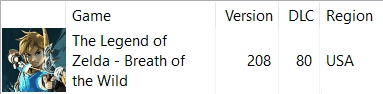
The game list shows The Legend of Zelda - Breath of the Wild with Version 208, DLC 80, and Region USA.
In Cemu, under Tools → Title Manager, you see the USA v80 DLC and the USA v208 Update.
If the game is missing, shows different numbers, or shows a different region, Crowd Control WILL NOT WORK. Repeat the steps above.
Optional - Copy old “Legacy” saves
If you have previously used our BOTW support, you can copy your old saves to the new version of CEMU manually. Make sure CEMU is not running before moving files.
Old save location:
%appdata%\CrowdControl-Apps\Emulators\CEMU\mlc01\usr\save\00050000\101c9400\user\80000001New save location:
%appdata%\CrowdControl-Apps\Emulators\CEMU-CC\portable\mlc01\usr\save\00050000\101c9400\user\80000001Create a back up of your saves by creating a zip of the
80000001folder on both installsDrag and drop the
80000001folder fromCEMU->CEMU-CC
4. Game Profile
For the best functionality and performance:
Right-click Breath of the Wild in Cemu's game list → Edit game profile
Set Mode to Triplecore-Recompiler
Set Thread quantum to the highest setting possible
On a slower CPU you can lower the threads, but keep Triplecore-Recompiler.
5. Graphics Packs
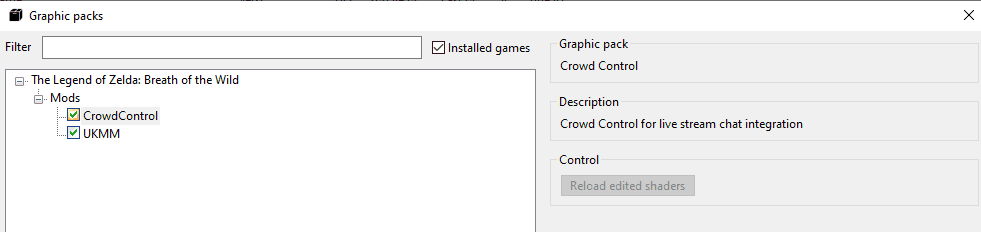
Under Mods, keep the Crowd Control and UKMM mods enabled. This pack connects the game to the Crowd Control app.
The Crowd Control graphics pack ships with our Cemu build. No separate download.
Extended Memory is known to not work. Leave it off.
By default we do not include any additional graphic packs, however you can download the latest community packs and use most! FPS++ is recommended if you are having framerate issues.
If you encounter any issues with graphic packs, try to disable a few until things work again.
6. Caching Shaders
The game stutters the first time you visit new areas, use new mechanics, or fight new creatures. This is Cemu compiling shader cache.
Once cached, the stutters stop. Run around Hyrule before your first stream to build the cache.
You can even trigger effects like a speed boost from the Effect List to cover more ground.
7. Test Before You Stream
You can only test effects after pressing "Start Session" in the Crowd Control app
Always test a few effects before going live to confirm effects trigger as expected
Skipping this step can lead to broken streams and confusion!
Credits
Thank you to MrBean35000vr and Chadderz for their work and permission to use the Accio code examples!
Additional thanks to Crementif, Emiyl, and all the other open source contributors for writing the Dumpling software and dumping guide.
Our CEMU build can be found here: https://github.com/WarpWorld/CEMU
We cannot help you find a copy of this game online. This guide only covers dumping your own copy from your Wii U.
1. System Requirements
64-bit Windows 10 or newer
CPU: at least 4 cores with 4 threads. Cemu can use up to 5 cores.
RAM: 8GB minimum, 16GB recommended
GPU: any NVIDIA card GTX 1060 or greater should handle the game. Higher is better.
AMD cards are supported but may have a harder time than an equivalent NVIDIA card. Your results may vary.
Use Vulkan on NVIDIA cards.
Get the game running well on its own before adding Crowd Control. We cannot help with performance issues. See the Cemu wiki for more performance tips.
2. What You Need
The US version of the Wii U game. Other regions are not supported.
All game updates AND the DLC pack installed. Crowd Control will not work without the DLC.
A Wii U console you own, to dump the game from. See the official Cemu game dumping guide: cemu.cfw.guide
Around 22GB of free space on a USB drive or SD card for the dump.
Dumping to an SD card can take around 6 hours, so plan ahead.
Double and triple check each step of the dumping guide before asking for help. Everything is covered there.
3. The Crowd Control App
Open Crowd Control Desktop App
Select Zelda: Breath of the Wild from the game list
Follow the Auto Setup checklist (left side of app)
When the Auto Setup checklist asks for the game file, select your dumped
U-King.rpx. It is located atDrive:\dumpling\Games\Breath of the Wild\code\U-King.rpx.The checklist installs our custom build of Cemu automatically. Only this build is supported. Versions of Cemu downloaded from anywhere else will not work.
Installing the Game Files
Once your files are dumped:
Copy the dump off your USB/SD drive first if you want it on your PC.
Install the game: File → Install game title, update, or DLC. Select the game folder
Game\The Legend of Zelda Breath of the Wild [ALZE01]Install the game update: File → Install game title, update, or DLC. Select the update folder
Update\The Legend of Zelda Breath of the Wild [ALZE01]Install the game DLC: File → Install game title, update, or DLC. Select the DLC folder
DLC\The Legend of Zelda Breath of the Wild [ALZE01]
We are looking for the FOLDER that these files are in, not any files directly.
Verify the install:
The game list shows The Legend of Zelda - Breath of the Wild with Version 208, DLC 80, and Region USA.
In Cemu, under Tools → Title Manager, you see the USA v80 DLC and the USA v208 Update.
If the game is missing, shows different numbers, or shows a different region, Crowd Control WILL NOT WORK. Repeat the steps above.
Optional - Copy old “Legacy” saves
If you have previously used our BOTW support, you can copy your old saves to the new version of CEMU manually. Make sure CEMU is not running before moving files.
Old save location:
%appdata%\CrowdControl-Apps\Emulators\CEMU\mlc01\usr\save\00050000\101c9400\user\80000001New save location:
%appdata%\CrowdControl-Apps\Emulators\CEMU-CC\portable\mlc01\usr\save\00050000\101c9400\user\80000001Create a back up of your saves by creating a zip of the
80000001folder on both installsDrag and drop the
80000001folder fromCEMU->CEMU-CC
4. Game Profile
For the best functionality and performance:
Right-click Breath of the Wild in Cemu's game list → Edit game profile
Set Mode to Triplecore-Recompiler
Set Thread quantum to the highest setting possible
On a slower CPU you can lower the threads, but keep Triplecore-Recompiler.
5. Graphics Packs
Under Mods, keep the Crowd Control and UKMM mods enabled. This pack connects the game to the Crowd Control app.
The Crowd Control graphics pack ships with our Cemu build. No separate download.
Extended Memory is known to not work. Leave it off.
By default we do not include any additional graphic packs, however you can download the latest community packs and use most! FPS++ is recommended if you are having framerate issues.
If you encounter any issues with graphic packs, try to disable a few until things work again.
6. Caching Shaders
The game stutters the first time you visit new areas, use new mechanics, or fight new creatures. This is Cemu compiling shader cache.
Once cached, the stutters stop. Run around Hyrule before your first stream to build the cache.
You can even trigger effects like a speed boost from the Effect List to cover more ground.
7. Test Before You Stream
You can only test effects after pressing "Start Session" in the Crowd Control app
Always test a few effects before going live to confirm effects trigger as expected
Skipping this step can lead to broken streams and confusion!
Credits
Thank you to MrBean35000vr and Chadderz for their work and permission to use the Accio code examples!
Additional thanks to Crementif, Emiyl, and all the other open source contributors for writing the Dumpling software and dumping guide.
Our CEMU build can be found here: https://github.com/WarpWorld/CEMU
Ready to get Started?
Start Streaming the Interactive Way
Have any Questions?
Check our FAQs, or join Discord for Support
Making a Game?
Consider integrating Crowd Control!
