

Crowd Control Setup Guides
CC Setup Guides
Beat Saber
Prerequisites
Our mod relies on bs-manager and Beat Saber v1.29.1, v1.35.0, v1.40.8, or v1.44.1 to proceed!
Grab the latest setup from the release page or download this: BSManager-Web-Setup-1.4.7.exe
Follow the setup on their GitHub to get things going: How to Install
You will need to make sure to install one of these versions: 1.29.1, 1.35.0, 1.40.8, or 1.44.1
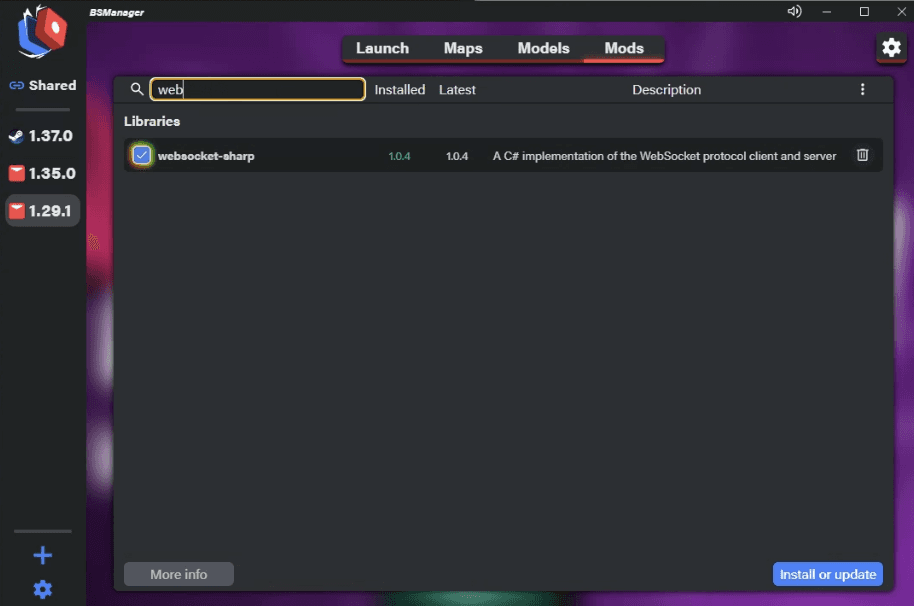
Once you have that installed, we also require these mod dependencies:
BSIPA
websocket-sharp
BS Utils
Setup
With the above configured, you can now setup Crowd Control!
Open the CC app and select “Beat Saber”.
Select your version! We currently suggest 1.29.1, but also support 1.35.0, 1.40.8, and 1.44.1.
On the setup checklist, click “Game Path” and select the main install folder of BSManager.
This is typically
%localappdata%\Programs\bs-managerUse the CC app “Launch Game” which will launch BSManager.
If you already have it open, you are all set, go to the next step!
From BSManager, click the cog at the top right and select “Open folder”.
Download and extract the connects of our zip to that folder:
For Beat Saber 1.35.0: BeatSaber1_35_0-CrowdControl.zip
For Beat Saber 1.40.8: BeatSaber1_40_8-CrowdControl.zip
For Beat Saber 1.44.1: BeatSaber1_44_1-CrowdControl.zip
For Beat Saber 1.29.1: BeatSaber1_29_1-CrowdControl.zip (updated July 12th, 2024)
This zip contains:Libs\ConnectorLib.JSON.dll Libs\CrowdControl.Extensions.dll Plugins\CrowdControl.dll
From BS Manager, press Launch!
After launching, you should now be able to press Start in the CC app!
Mod Compatibility
Some other mods are known to cause issues or not work at all with Crowd Control.
JDFixer
Not compatible!
Claws
Will need to disable “Short Sabers”.
NoodleExtensions
Limited support. Some may not work, some may! Please report if you are noticing any problems using this mod.
SaberTailor
May cause issues. Please report if you are noticing any problems using this mod.
Chroma
May cause issues. Please report if you are noticing any problems using this mod.
BeatTogether
May cause issues. Please report if you are noticing any problems using this mod.
Notes
Some things to look forward to…
More effects
Our mod listed on BSManager
Auto CC session start when Beat Saber connects
While Crowd Control is enabled, BeatLeader and ScoreSaber will reject any submissions!
Prerequisites
Our mod relies on bs-manager and Beat Saber v1.29.1, v1.35.0, v1.40.8, or v1.44.1 to proceed!
Grab the latest setup from the release page or download this: BSManager-Web-Setup-1.4.7.exe
Follow the setup on their GitHub to get things going: How to Install
You will need to make sure to install one of these versions: 1.29.1, 1.35.0, 1.40.8, or 1.44.1
Once you have that installed, we also require these mod dependencies:
BSIPA
websocket-sharp
BS Utils
Setup
With the above configured, you can now setup Crowd Control!
Open the CC app and select “Beat Saber”.
Select your version! We currently suggest 1.29.1, but also support 1.35.0, 1.40.8, and 1.44.1.
On the setup checklist, click “Game Path” and select the main install folder of BSManager.
This is typically
%localappdata%\Programs\bs-managerUse the CC app “Launch Game” which will launch BSManager.
If you already have it open, you are all set, go to the next step!
From BSManager, click the cog at the top right and select “Open folder”.
Download and extract the connects of our zip to that folder:
For Beat Saber 1.35.0: BeatSaber1_35_0-CrowdControl.zip
For Beat Saber 1.40.8: BeatSaber1_40_8-CrowdControl.zip
For Beat Saber 1.44.1: BeatSaber1_44_1-CrowdControl.zip
For Beat Saber 1.29.1: BeatSaber1_29_1-CrowdControl.zip (updated July 12th, 2024)
This zip contains:Libs\ConnectorLib.JSON.dll Libs\CrowdControl.Extensions.dll Plugins\CrowdControl.dll
From BS Manager, press Launch!
After launching, you should now be able to press Start in the CC app!
Mod Compatibility
Some other mods are known to cause issues or not work at all with Crowd Control.
JDFixer
Not compatible!
Claws
Will need to disable “Short Sabers”.
NoodleExtensions
Limited support. Some may not work, some may! Please report if you are noticing any problems using this mod.
SaberTailor
May cause issues. Please report if you are noticing any problems using this mod.
Chroma
May cause issues. Please report if you are noticing any problems using this mod.
BeatTogether
May cause issues. Please report if you are noticing any problems using this mod.
Notes
Some things to look forward to…
More effects
Our mod listed on BSManager
Auto CC session start when Beat Saber connects
While Crowd Control is enabled, BeatLeader and ScoreSaber will reject any submissions!
Ready to get Started?
Start Streaming the Interactive Way
Have any Questions?
Check our FAQs, or join Discord for Support
Making a Game?
Consider integrating Crowd Control!
