
Guide
How to Price Your Interactive Crowd Control Streams

Moni
Head of Marketing
Have any Crowd Control Questions?
Our Team is quick to answer!
Looking at the current state of the creator economy and poor offers from the Twitch Ads Incentive Program, we feel the responsibility to educate you better on Crowd Control and how it can massively impact and help you increase your stream and on-platform revenue.
SO — today’s blog post is all about giving you some inspiration and tips on how to properly price your Crowd Control sessions to maximize viewer engagement and revenue.
Wait, what is Crowd Control?
Lol, I’m glad you asked. For those who might not know, Crowd Control is an interactive gaming app that lets your viewers directly interact with the games you play on stream. This, by allowing viewers to redeem effects that will trigger in game, in real time. No cards or challenges you will have to manually do, but direct integration with the game. Crowd Control also provides a tool to Game Developers to easily bring stream interactivity to their games.
Play
When using Crowd Control on Twitch, Coins, the Crowd Control currency, can be purchased with Twitch Bits. 1 Twitch Bit : 1 Coin : ~0.01USD. The action of buying coins will act as a Twitch ‘Cheer’. You can see how much you make from Extensions on your Twitch Channel Analytics.
Crowd Control currently supports over 100 games, from retro classics like Super Mario 64 and The Legend of Zelda: Ocarina of Time to modern favorites like Minecraft and Skyrim.
PRO TIP: Streamers are free to use Crowd Control as many times as they want — and we love you for it — however, our recommendation to maximize engagement and revenue is to do 1 or 2 3-hour sessions per month.
TIP #1 — Advanced Pricing Is Your Best Friend
Crowd Control is very modular and customizable for a reason: You know your community better than we do! To make sure your Crowd Control session is as interactive as it can, our Advanced Pricing features like Price Scaling and Cooldowns will be your best friends.
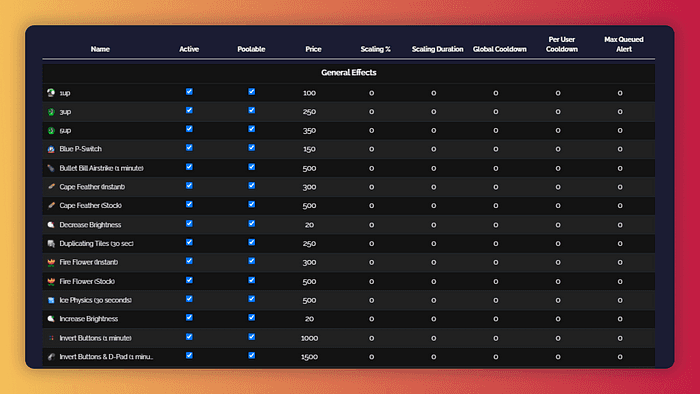
This is how Advanced Pricing looks. You can find Advanced Pricing in the pricing page. By hovering over the settings, you can read tool tips on what each mean.
Price ScalingUnder Advanced Pricing you’ll find Price Scaling. This “supply and demand” feature will increase an effect’s price automatically after being used. You can customize for how long the increased price lasts or in what % the price will increase (example: after used, an effect goes from 100 Coins to 200 Coins with a 100% scaling). Price Scaling is perfect for the more catastrophic effects like “Kill Player” in Minecraft or “Roll Credits” in Dark Souls, as you know if it gets spammed, at least you’re making a few extra bucks!
CooldownsTalking about spamming, cooldowns will make sure you’re protected. You can set up a per-effect cooldown or per-user cooldown to make sure no effect gets spammed and everyone has a good time.
TIP #2 — Make 1 or 2 Effects — that are not that negative, but are very visual — Free
To familiarize your viewers to Crowd Control, you want them to be able to send an effect or two at little to no actual cost to themselves. Almost like a free sample at Costco is intended to convince you that frozen pizza is delicious. Because you expect these effects to be sent more often than any others, it’s important they don’t hinder your gameplay too much. They will also be the advertisement for Crowd Control on your stream to the rest of the audience, so they need to have visual impact (i.e. “Invert Controls” gives 0 visual feedback, while “Rotate Screen” is massive visual feedback.).

In this case, Roll Credits for Dark Souls and Lightning Strike on Breath of the Wild are very visual effects.
To make these effects free, make sure you price them between 50 and 200 coins. Why? Because the viewer will be able to use the Free Coins they get every session to purchase that effect.
TIP #3 — Chat Can Torture You. But first, they gotta pay.
Almost the inverse of Tip #2. If an effect will cause you to lose significant progression in the game, it’s worth making pricy.
Effects like “Kill Player”, “Restart Level” among others should all be priced out of free coin and Tier 2 subscriber range. Tier 3 subscribers should be able to do some of these, but that’s it. Make these effects valuable.
Every good joke gets boring when it’s told too much. If you make the really good stuff too cheap, it’s going to lose its magic.
TIP #4 — Think About Your Community While Setting Prices
Every streamer is going to have different experiences. High view count doesn’t necessarily imply a good Crowd Control session. Streamers with a bigger focus on community typically have more interaction in CC than ones more focused on gameplay. If your stream brings in lots of gift subs and cheers regularly, you’re likely to be able to price sessions a little higher.
TIP #5 — Learn From Other Crowd Control Streamers
Crowd Control has helped Twitch Partners and live creators of all sizes and backgrounds make hundreds of thousands of dollars in stream revenue. And we’re super lucky that some of our top creators have joined us as extended part of our team by being Crowd Control Ambassadors.
A few days ago, Crowd Control Ambassador xwater joined us in a livestream and led a 45 min session on what his thought process is when pricing his Crowd Control sessions. And most of the fundamentals he shared, inspired this list! Make sure to check out the full session, followed by a Q&A with the Crowd Control team on our YouTube channel.
Play
And there you have it! Those are some tips and tricks on how to price your Crowd Control sessions and Effects for you to maximize interactive and revenue. Before we go though, we also wanted to give you some tips beyond pricing that could also take your Crowd Control sessions to the next level.
Plan your Crowd Control sessions.
Call to Actions are Key.
Get Crowd Control Pro.
I really you enjoyed today’s post and if you have any other questions about Crowd Control, you can always connect with us on Twitter! What should we write about next?
Looking at the current state of the creator economy and poor offers from the Twitch Ads Incentive Program, we feel the responsibility to educate you better on Crowd Control and how it can massively impact and help you increase your stream and on-platform revenue.
SO — today’s blog post is all about giving you some inspiration and tips on how to properly price your Crowd Control sessions to maximize viewer engagement and revenue.
Wait, what is Crowd Control?
Lol, I’m glad you asked. For those who might not know, Crowd Control is an interactive gaming app that lets your viewers directly interact with the games you play on stream. This, by allowing viewers to redeem effects that will trigger in game, in real time. No cards or challenges you will have to manually do, but direct integration with the game. Crowd Control also provides a tool to Game Developers to easily bring stream interactivity to their games.
Play
When using Crowd Control on Twitch, Coins, the Crowd Control currency, can be purchased with Twitch Bits. 1 Twitch Bit : 1 Coin : ~0.01USD. The action of buying coins will act as a Twitch ‘Cheer’. You can see how much you make from Extensions on your Twitch Channel Analytics.
Crowd Control currently supports over 100 games, from retro classics like Super Mario 64 and The Legend of Zelda: Ocarina of Time to modern favorites like Minecraft and Skyrim.
PRO TIP: Streamers are free to use Crowd Control as many times as they want — and we love you for it — however, our recommendation to maximize engagement and revenue is to do 1 or 2 3-hour sessions per month.
TIP #1 — Advanced Pricing Is Your Best Friend
Crowd Control is very modular and customizable for a reason: You know your community better than we do! To make sure your Crowd Control session is as interactive as it can, our Advanced Pricing features like Price Scaling and Cooldowns will be your best friends.
This is how Advanced Pricing looks. You can find Advanced Pricing in the pricing page. By hovering over the settings, you can read tool tips on what each mean.
Price ScalingUnder Advanced Pricing you’ll find Price Scaling. This “supply and demand” feature will increase an effect’s price automatically after being used. You can customize for how long the increased price lasts or in what % the price will increase (example: after used, an effect goes from 100 Coins to 200 Coins with a 100% scaling). Price Scaling is perfect for the more catastrophic effects like “Kill Player” in Minecraft or “Roll Credits” in Dark Souls, as you know if it gets spammed, at least you’re making a few extra bucks!
CooldownsTalking about spamming, cooldowns will make sure you’re protected. You can set up a per-effect cooldown or per-user cooldown to make sure no effect gets spammed and everyone has a good time.
TIP #2 — Make 1 or 2 Effects — that are not that negative, but are very visual — Free
To familiarize your viewers to Crowd Control, you want them to be able to send an effect or two at little to no actual cost to themselves. Almost like a free sample at Costco is intended to convince you that frozen pizza is delicious. Because you expect these effects to be sent more often than any others, it’s important they don’t hinder your gameplay too much. They will also be the advertisement for Crowd Control on your stream to the rest of the audience, so they need to have visual impact (i.e. “Invert Controls” gives 0 visual feedback, while “Rotate Screen” is massive visual feedback.).
In this case, Roll Credits for Dark Souls and Lightning Strike on Breath of the Wild are very visual effects.
To make these effects free, make sure you price them between 50 and 200 coins. Why? Because the viewer will be able to use the Free Coins they get every session to purchase that effect.
TIP #3 — Chat Can Torture You. But first, they gotta pay.
Almost the inverse of Tip #2. If an effect will cause you to lose significant progression in the game, it’s worth making pricy.
Effects like “Kill Player”, “Restart Level” among others should all be priced out of free coin and Tier 2 subscriber range. Tier 3 subscribers should be able to do some of these, but that’s it. Make these effects valuable.
Every good joke gets boring when it’s told too much. If you make the really good stuff too cheap, it’s going to lose its magic.
TIP #4 — Think About Your Community While Setting Prices
Every streamer is going to have different experiences. High view count doesn’t necessarily imply a good Crowd Control session. Streamers with a bigger focus on community typically have more interaction in CC than ones more focused on gameplay. If your stream brings in lots of gift subs and cheers regularly, you’re likely to be able to price sessions a little higher.
TIP #5 — Learn From Other Crowd Control Streamers
Crowd Control has helped Twitch Partners and live creators of all sizes and backgrounds make hundreds of thousands of dollars in stream revenue. And we’re super lucky that some of our top creators have joined us as extended part of our team by being Crowd Control Ambassadors.
A few days ago, Crowd Control Ambassador xwater joined us in a livestream and led a 45 min session on what his thought process is when pricing his Crowd Control sessions. And most of the fundamentals he shared, inspired this list! Make sure to check out the full session, followed by a Q&A with the Crowd Control team on our YouTube channel.
Play
And there you have it! Those are some tips and tricks on how to price your Crowd Control sessions and Effects for you to maximize interactive and revenue. Before we go though, we also wanted to give you some tips beyond pricing that could also take your Crowd Control sessions to the next level.
Plan your Crowd Control sessions.
Call to Actions are Key.
Get Crowd Control Pro.
I really you enjoyed today’s post and if you have any other questions about Crowd Control, you can always connect with us on Twitter! What should we write about next?
" width="14.000000116459887px"><path d="M 3.269 0 C 5.075 0 6.538 1.464 6.538 3.269 C 6.538 5.075 5.075 6.538 3.269 6.538 C 1.464 6.538 0 5.075 0 3.269 C 0 1.464 1.464 0 3.269 0 Z M 2.177 2.015 C 2.114 1.989 2.039 1.958 1.98 2.003 C 1.95 2.024 1.928 2.054 1.906 2.082 L 1.902 2.087 C 1.866 2.135 1.825 2.183 1.778 2.22 C 1.67 2.31 1.536 2.354 1.394 2.361 L 1.392 2.361 C 1.368 2.362 1.343 2.365 1.319 2.37 C 1.23 2.388 1.208 2.456 1.192 2.54 C 1.189 2.554 1.186 2.569 1.183 2.583 C 1.171 2.636 1.158 2.695 1.173 2.74 C 1.204 2.832 1.372 2.822 1.477 2.815 L 1.49 2.814 C 1.502 2.813 1.513 2.813 1.523 2.812 C 1.608 2.806 1.673 2.823 1.718 2.901 C 1.939 3.363 2.222 3.801 2.607 4.159 C 2.624 4.174 2.642 4.189 2.661 4.201 C 2.686 4.216 2.714 4.224 2.74 4.22 C 2.791 4.21 2.827 4.17 2.86 4.132 L 2.863 4.129 C 2.869 4.123 2.875 4.116 2.881 4.11 C 2.887 4.102 2.894 4.095 2.901 4.087 C 2.937 4.047 2.977 4.002 2.98 3.95 C 2.982 3.911 2.961 3.878 2.936 3.849 C 2.76 3.667 2.59 3.477 2.449 3.269 C 2.324 3.082 2.208 2.89 2.134 2.68 C 2.125 2.646 2.121 2.611 2.129 2.576 C 2.14 2.526 2.173 2.485 2.206 2.444 L 2.219 2.427 C 2.258 2.379 2.294 2.329 2.325 2.276 C 2.348 2.236 2.372 2.188 2.36 2.142 L 2.36 2.141 C 2.343 2.084 2.276 2.056 2.22 2.033 C 2.207 2.028 2.194 2.023 2.183 2.018 Z M 5.468 2.642 C 5.442 2.639 5.413 2.638 5.388 2.646 L 5.304 2.726 C 5.199 2.935 5.028 3.05 4.795 3.067 C 4.766 3.071 4.736 3.077 4.712 3.093 L 4.711 3.093 C 4.661 3.126 4.649 3.195 4.638 3.258 L 4.637 3.261 C 4.634 3.277 4.631 3.293 4.628 3.308 C 4.623 3.331 4.619 3.354 4.614 3.377 L 4.612 3.389 L 4.611 3.393 C 4.601 3.444 4.591 3.494 4.582 3.541 C 4.578 3.566 4.574 3.591 4.578 3.616 C 4.583 3.656 4.614 3.681 4.653 3.691 C 5.086 3.76 5.545 3.534 5.788 3.176 C 5.845 3.092 5.976 2.864 5.935 2.768 C 5.915 2.726 5.858 2.715 5.811 2.706 C 5.801 2.704 5.791 2.703 5.782 2.701 C 5.746 2.694 5.708 2.687 5.67 2.679 C 5.603 2.666 5.536 2.653 5.468 2.642 Z M 3.146 1.105 C 3.094 1.1 3.037 1.095 2.997 1.131 C 2.978 1.151 2.968 1.181 2.963 1.214 C 2.912 1.824 2.997 2.394 3.257 2.859 C 3.284 2.901 3.327 2.926 3.377 2.911 C 3.406 2.903 3.432 2.889 3.458 2.875 C 3.46 2.873 3.463 2.872 3.465 2.87 C 3.522 2.839 3.582 2.805 3.64 2.772 L 3.69 2.744 C 3.699 2.739 3.708 2.733 3.718 2.728 C 3.764 2.702 3.814 2.674 3.826 2.621 L 3.826 2.621 C 3.831 2.598 3.826 2.573 3.818 2.55 C 3.663 2.204 3.583 1.819 3.604 1.38 C 3.604 1.366 3.604 1.352 3.605 1.337 C 3.608 1.284 3.61 1.227 3.584 1.185 C 3.559 1.148 3.512 1.138 3.471 1.133 C 3.407 1.127 3.343 1.121 3.279 1.116 C 3.246 1.113 3.214 1.111 3.182 1.108 C 3.17 1.107 3.158 1.106 3.146 1.105 Z M 5.376 2.65 C 5.375 2.651 5.373 2.652 5.371 2.653 L 5.375 2.651 Z" fill="rgb(234, 61, 106)" height="6.538250575370619px" id="EHOHSwCqJ" transform="translate(0 2.239)" width="6.538250568278272px"/><path d="M 1.24 0.899 C 1.24 1.156 1.293 1.399 1.388 1.621 C 1.393 1.632 1.392 1.645 1.387 1.655 C 1.381 1.666 1.371 1.673 1.359 1.676 C 0.828 1.772 0.334 2.051 0.109 2.209 C 0.099 2.216 0.086 2.218 0.074 2.214 C 0.062 2.209 0.053 2.199 0.05 2.187 C 0.011 2.025 -0.005 1.859 0.001 1.692 C 0.034 0.858 0.627 0.179 1.404 0.001 C 1.435 -0.006 1.46 0.028 1.445 0.057 C 1.31 0.317 1.239 0.606 1.24 0.899 Z" fill="rgb(234, 61, 106)" height="2.215802804588664px" id="f7GQHGnLg" transform="translate(1.053 0)" width="1.4492800256519736px"/><path d="M 3.269 0 C 5.075 0 6.538 1.464 6.538 3.269 C 6.538 5.075 5.075 6.538 3.269 6.538 C 1.464 6.538 0 5.075 0 3.269 C 0 1.464 1.464 0 3.269 0 Z M 3.833 2.887 C 3.802 2.893 3.77 2.91 3.739 2.928 L 3.738 2.928 C 3.712 2.943 3.685 2.958 3.659 2.974 C 3.584 3.017 3.535 3.06 3.545 3.153 C 3.547 3.171 3.549 3.188 3.552 3.205 C 3.556 3.235 3.56 3.264 3.561 3.294 C 3.576 3.688 3.118 3.935 2.798 3.698 C 2.782 3.687 2.767 3.676 2.753 3.663 C 2.723 3.638 2.692 3.613 2.654 3.602 L 2.654 3.602 C 2.603 3.589 2.553 3.613 2.508 3.638 C 2.479 3.654 2.45 3.671 2.421 3.688 L 2.416 3.691 C 2.369 3.719 2.311 3.755 2.317 3.817 C 2.326 3.903 2.445 4.004 2.511 4.056 C 3.221 4.598 4.209 3.929 3.989 3.071 L 3.988 3.068 C 3.967 2.991 3.934 2.87 3.833 2.887 Z M 2.32 2.836 C 1.907 2.311 1.071 2.37 0.732 2.945 C 0.594 3.177 0.552 3.467 0.629 3.727 C 0.661 3.828 0.696 3.934 0.823 3.878 C 0.863 3.86 0.901 3.837 0.939 3.815 C 0.957 3.805 0.974 3.794 0.992 3.784 C 1.092 3.727 1.15 3.692 1.133 3.57 C 1.123 3.491 1.117 3.412 1.14 3.335 L 1.14 3.334 C 1.21 3.068 1.528 2.928 1.769 3.06 C 1.8 3.075 1.828 3.097 1.856 3.118 C 1.88 3.136 1.905 3.155 1.93 3.169 C 1.962 3.186 1.997 3.187 2.032 3.175 C 2.066 3.163 2.099 3.145 2.13 3.127 L 2.137 3.123 L 2.174 3.102 C 2.211 3.081 2.247 3.061 2.282 3.039 C 2.371 2.985 2.385 2.921 2.32 2.836 Z M 4.579 1.271 C 4.366 1.119 4.092 1.055 3.834 1.102 C 3.639 1.138 3.459 1.234 3.32 1.376 C 3.085 1.613 2.983 1.975 3.064 2.3 L 3.068 2.314 C 3.087 2.383 3.115 2.482 3.18 2.503 C 3.226 2.514 3.276 2.488 3.317 2.465 L 3.318 2.465 L 3.325 2.461 C 3.372 2.435 3.418 2.408 3.465 2.381 C 3.505 2.357 3.549 2.33 3.568 2.286 C 3.586 2.25 3.582 2.207 3.577 2.168 L 3.577 2.167 C 3.542 1.976 3.62 1.777 3.791 1.681 L 3.792 1.68 C 3.952 1.585 4.164 1.612 4.305 1.733 L 4.308 1.736 L 4.312 1.739 C 4.322 1.746 4.332 1.755 4.343 1.762 C 4.363 1.776 4.383 1.787 4.406 1.792 C 4.458 1.804 4.51 1.776 4.554 1.752 L 4.568 1.744 C 4.62 1.715 4.671 1.685 4.721 1.654 C 4.766 1.628 4.815 1.589 4.804 1.531 C 4.787 1.439 4.652 1.325 4.579 1.271 Z" fill="rgb(255, 236, 59)" height="6.538250573381028px" id="PKYXAbHzG" transform="translate(7.462 2.195)" width="6.538250562779467px"/><path d="M 0.265 0.872 C 0.616 1.141 1.117 1.29 1.565 1.282 C 1.786 1.273 2.031 1.231 2.155 1.035 C 2.224 0.923 2.221 0.783 2.162 0.667 C 1.92 0.235 1.222 0.021 0.75 0.001 C 0.52 -0.005 0.254 0.018 0.091 0.194 C -0.108 0.426 0.052 0.707 0.264 0.871 L 0.265 0.872 Z M 0.679 0.361 C 1.004 0.364 1.377 0.467 1.659 0.649 C 1.705 0.678 1.898 0.817 1.828 0.868 C 1.775 0.914 1.549 0.931 1.396 0.915 C 1.152 0.893 0.915 0.827 0.696 0.718 C 0.566 0.654 0.339 0.504 0.363 0.437 C 0.399 0.372 0.607 0.361 0.678 0.361 L 0.679 0.361 L 0.679 0.361 Z" fill="rgb(255, 236, 59)" height="1.2826122415748673px" id="SRezIcBjl" transform="translate(10.929 0.483)" width="2.2065572669175775px"/></g></svg>)
Crowd Control lets your viewers send effects like interactive puzzles, jumpscares, and even in-game events: no matter where or what you stream.
Link effects to all kinds of actions, including TikTok Gifts, Likes, Shares and Follows, plus Twitch Channel Points, Subs, Raids and more!
Have any Crowd Control Questions?
Our Team is quick to answer!
Ready to get Started?
Start Streaming the Interactive Way
Have any Questions?
Check our FAQs, or join Discord for Support
Making a Game?
Consider integrating Crowd Control!