
Guide
Every Crowd Control Feature [As of June 2026]

Moni Mendez
Head of Marketing
Have any Crowd Control Questions?
Our Team is quick to answer!

In the last few years, Crowd Control has shipped dozens of updates. Today, we're running through every feature on offer, whether you're a streamer, a viewer, a game developer, or something else entirely.
If you're new here: Crowd Control is an app that lets your chat add interactions directly to your stream. Think jumpscares, puzzles, and in-game events, all triggered by your community in real time.
Works on Any Platform
Crowd Control works no matter where you stream. Twitch streamers can use the Crowd Control Extension, and creators on other platforms can share their Interact Link. Twitch and TikTok users also get a few extra integrations, more on that below.
200+ Game Integrations
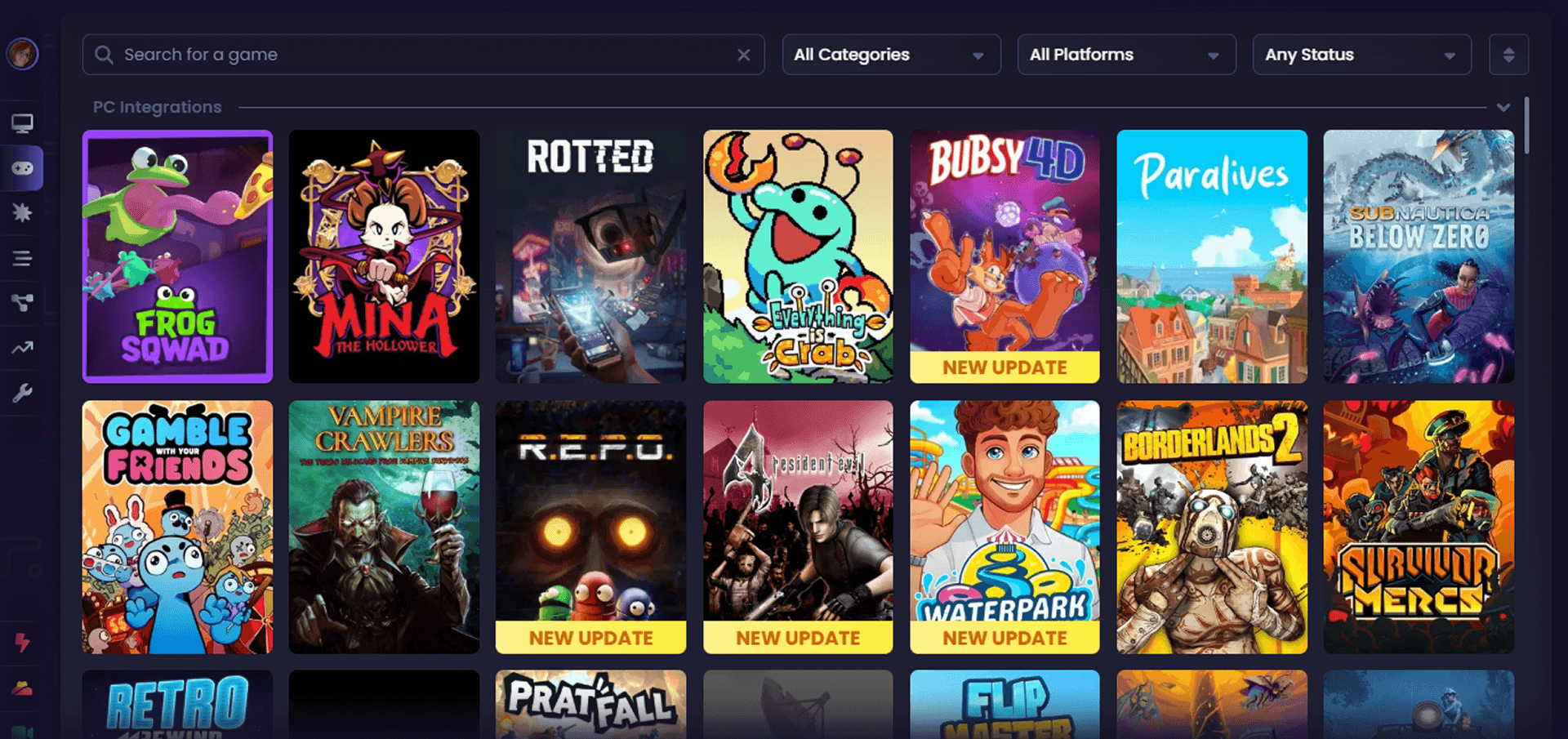
Every creator who downloads Crowd Control gets access to over 200 game integrations and the thousands of in-game effects that come with them.
Some games launch in Early Access for Pro and Max subscribers first, then roll out to everyone.
Game developers get free access to our development tools, making integration as simple as copy and paste. Every game comes with a step-by-step setup guide.
Each effect supports customizable:
Pricing
Scaling
Cooldowns
Durations (Pro and Max only)
You can also set effects to paid only, link sound effects, or connect to third-party services like Voicemod, Streamfog, VNyan, Lumia, Streamer.bot, Streamlabs, Pulsoid, and more.

Disrupts: Always-On Interactions
Disrupts are completely free and let you bring always-on chat interactions to your stream, no matter what you're playing.
Upload limits for custom Disrupts:
Free: 500MB
Pro: 5GB
Max: 10GB

How Viewers Send Effects
Most effects are triggered with Coins. 100 Coins = $1 USD, purchasable via Stripe, PayPal, or exchanged for Twitch Bits.
Other ways viewers can get involved:
50 Free Coins every session
Twitch subscribers can redeem bonus coins
Viewers can redeem Channel Points for coins
Pro and Max unlock additional coin settings, including custom amounts and limits
Beyond Coins
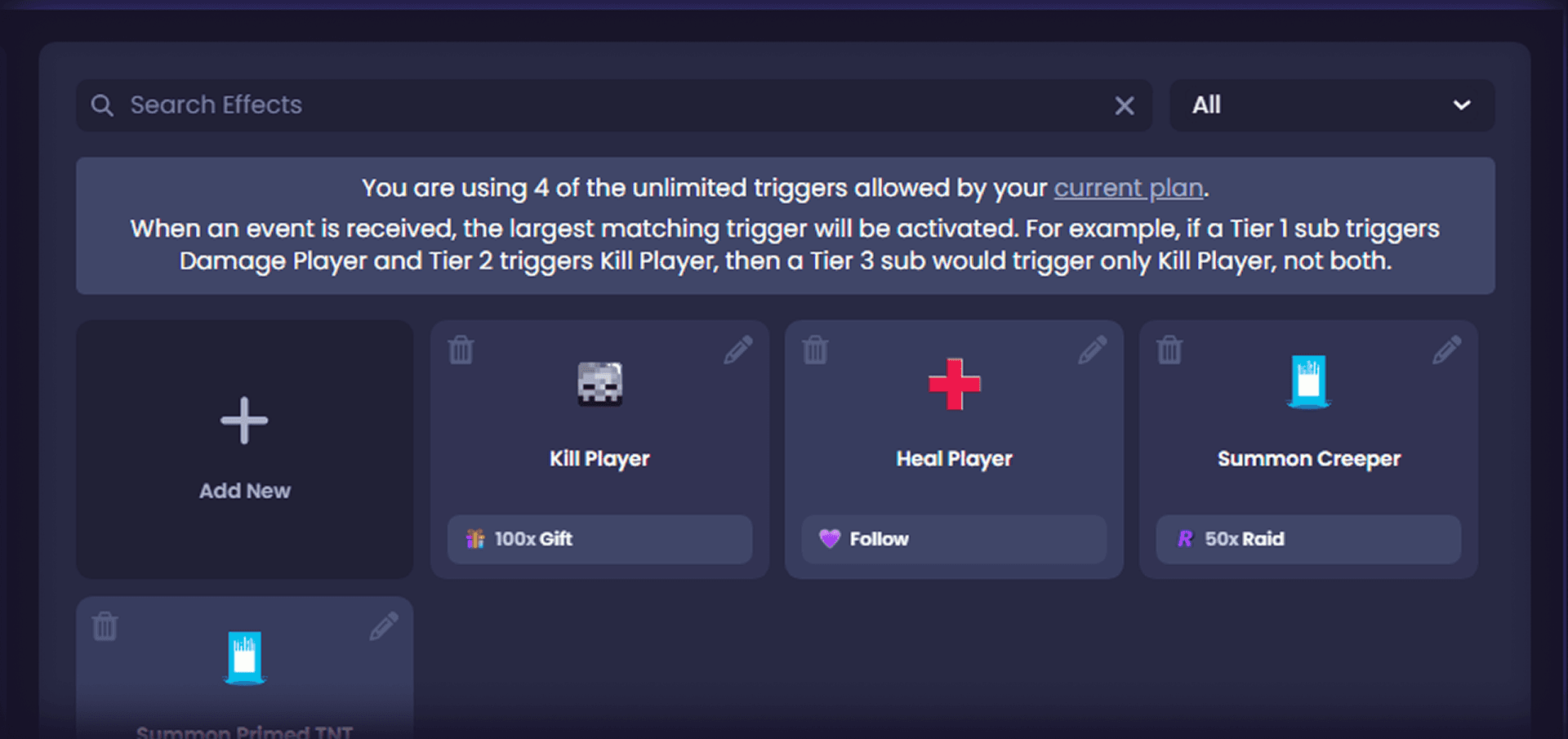
Effects can also be linked directly to:
Twitch Channel Rewards: 3 free, 12 with Pro, unlimited with Max
TikTok Gifts: 5 free, 12 with Pro, unlimited with Max
Max only: Twitch Follows, Subs, and Raids, plus TikTok Likes, Follows, and Shares
Overlays
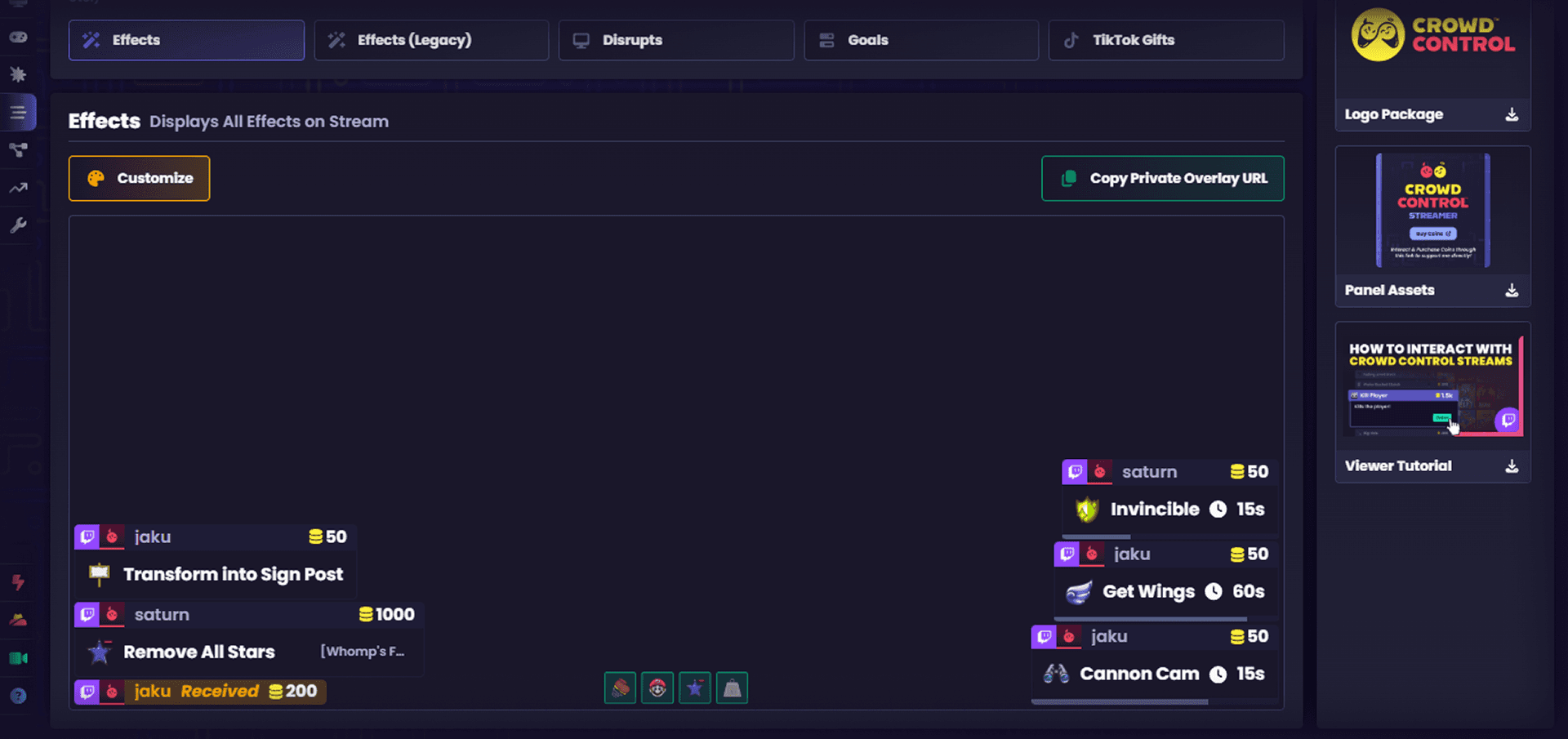
Effect Overlay: Shows active effects on stream or your monitor
TikTok Overlay: Shows which gifts trigger which effects
Goal Overlays: Track Coins, Effects, Revenue, and Users
More Features at a Glance
Multiplayer Lobbies: Share the Crowd Control chaos with friends or your viewers. Join a lobby for free, host a lobby with Crowd Control Pro
Chaos Bot: Automatically sends effects to keep the chaos going
Import/Export: Effect Lists and Disrupts can be exported and imported
One-Clicks: Streamlined setup for popular configurations
Crowd Control Partner: Unlocks a higher revenue cut
Pro perks: Send effects anonymously, earn 3% more in global coins, and auto-claim free coins
Options Page: Manage game paths, files, and other settings
A Note from the Team
We have no intention of pricing users out of basic features. Our goal is the best possible experience for everyone, while acknowledging the real costs of running our servers.
By subscribing to Crowd Control Pro or Max, you help us keep the core experience free for everybody.
Thank you to all our users. Happy streaming.
In the last few years, Crowd Control has shipped dozens of updates. Today, we're running through every feature on offer, whether you're a streamer, a viewer, a game developer, or something else entirely.
If you're new here: Crowd Control is an app that lets your chat add interactions directly to your stream. Think jumpscares, puzzles, and in-game events, all triggered by your community in real time.
Works on Any Platform
Crowd Control works no matter where you stream. Twitch streamers can use the Crowd Control Extension, and creators on other platforms can share their Interact Link. Twitch and TikTok users also get a few extra integrations, more on that below.
200+ Game Integrations
Every creator who downloads Crowd Control gets access to over 200 game integrations and the thousands of in-game effects that come with them.
Some games launch in Early Access for Pro and Max subscribers first, then roll out to everyone.
Game developers get free access to our development tools, making integration as simple as copy and paste. Every game comes with a step-by-step setup guide.
Each effect supports customizable:
Pricing
Scaling
Cooldowns
Durations (Pro and Max only)
You can also set effects to paid only, link sound effects, or connect to third-party services like Voicemod, Streamfog, VNyan, Lumia, Streamer.bot, Streamlabs, Pulsoid, and more.
Disrupts: Always-On Interactions
Disrupts are completely free and let you bring always-on chat interactions to your stream, no matter what you're playing.
Upload limits for custom Disrupts:
Free: 500MB
Pro: 5GB
Max: 10GB
How Viewers Send Effects
Most effects are triggered with Coins. 100 Coins = $1 USD, purchasable via Stripe, PayPal, or exchanged for Twitch Bits.
Other ways viewers can get involved:
50 Free Coins every session
Twitch subscribers can redeem bonus coins
Viewers can redeem Channel Points for coins
Pro and Max unlock additional coin settings, including custom amounts and limits
Beyond Coins
Effects can also be linked directly to:
Twitch Channel Rewards: 3 free, 12 with Pro, unlimited with Max
TikTok Gifts: 5 free, 12 with Pro, unlimited with Max
Max only: Twitch Follows, Subs, and Raids, plus TikTok Likes, Follows, and Shares
Overlays
Effect Overlay: Shows active effects on stream or your monitor
TikTok Overlay: Shows which gifts trigger which effects
Goal Overlays: Track Coins, Effects, Revenue, and Users
More Features at a Glance
Multiplayer Lobbies: Share the Crowd Control chaos with friends or your viewers. Join a lobby for free, host a lobby with Crowd Control Pro
Chaos Bot: Automatically sends effects to keep the chaos going
Import/Export: Effect Lists and Disrupts can be exported and imported
One-Clicks: Streamlined setup for popular configurations
Crowd Control Partner: Unlocks a higher revenue cut
Pro perks: Send effects anonymously, earn 3% more in global coins, and auto-claim free coins
Options Page: Manage game paths, files, and other settings
A Note from the Team
We have no intention of pricing users out of basic features. Our goal is the best possible experience for everyone, while acknowledging the real costs of running our servers.
By subscribing to Crowd Control Pro or Max, you help us keep the core experience free for everybody.
Thank you to all our users. Happy streaming.
" width="14.000000116459887px"><path d="M 3.269 0 C 5.075 0 6.538 1.464 6.538 3.269 C 6.538 5.075 5.075 6.538 3.269 6.538 C 1.464 6.538 0 5.075 0 3.269 C 0 1.464 1.464 0 3.269 0 Z M 2.177 2.015 C 2.114 1.989 2.039 1.958 1.98 2.003 C 1.95 2.024 1.928 2.054 1.906 2.082 L 1.902 2.087 C 1.866 2.135 1.825 2.183 1.778 2.22 C 1.67 2.31 1.536 2.354 1.394 2.361 L 1.392 2.361 C 1.368 2.362 1.343 2.365 1.319 2.37 C 1.23 2.388 1.208 2.456 1.192 2.54 C 1.189 2.554 1.186 2.569 1.183 2.583 C 1.171 2.636 1.158 2.695 1.173 2.74 C 1.204 2.832 1.372 2.822 1.477 2.815 L 1.49 2.814 C 1.502 2.813 1.513 2.813 1.523 2.812 C 1.608 2.806 1.673 2.823 1.718 2.901 C 1.939 3.363 2.222 3.801 2.607 4.159 C 2.624 4.174 2.642 4.189 2.661 4.201 C 2.686 4.216 2.714 4.224 2.74 4.22 C 2.791 4.21 2.827 4.17 2.86 4.132 L 2.863 4.129 C 2.869 4.123 2.875 4.116 2.881 4.11 C 2.887 4.102 2.894 4.095 2.901 4.087 C 2.937 4.047 2.977 4.002 2.98 3.95 C 2.982 3.911 2.961 3.878 2.936 3.849 C 2.76 3.667 2.59 3.477 2.449 3.269 C 2.324 3.082 2.208 2.89 2.134 2.68 C 2.125 2.646 2.121 2.611 2.129 2.576 C 2.14 2.526 2.173 2.485 2.206 2.444 L 2.219 2.427 C 2.258 2.379 2.294 2.329 2.325 2.276 C 2.348 2.236 2.372 2.188 2.36 2.142 L 2.36 2.141 C 2.343 2.084 2.276 2.056 2.22 2.033 C 2.207 2.028 2.194 2.023 2.183 2.018 Z M 5.468 2.642 C 5.442 2.639 5.413 2.638 5.388 2.646 L 5.304 2.726 C 5.199 2.935 5.028 3.05 4.795 3.067 C 4.766 3.071 4.736 3.077 4.712 3.093 L 4.711 3.093 C 4.661 3.126 4.649 3.195 4.638 3.258 L 4.637 3.261 C 4.634 3.277 4.631 3.293 4.628 3.308 C 4.623 3.331 4.619 3.354 4.614 3.377 L 4.612 3.389 L 4.611 3.393 C 4.601 3.444 4.591 3.494 4.582 3.541 C 4.578 3.566 4.574 3.591 4.578 3.616 C 4.583 3.656 4.614 3.681 4.653 3.691 C 5.086 3.76 5.545 3.534 5.788 3.176 C 5.845 3.092 5.976 2.864 5.935 2.768 C 5.915 2.726 5.858 2.715 5.811 2.706 C 5.801 2.704 5.791 2.703 5.782 2.701 C 5.746 2.694 5.708 2.687 5.67 2.679 C 5.603 2.666 5.536 2.653 5.468 2.642 Z M 3.146 1.105 C 3.094 1.1 3.037 1.095 2.997 1.131 C 2.978 1.151 2.968 1.181 2.963 1.214 C 2.912 1.824 2.997 2.394 3.257 2.859 C 3.284 2.901 3.327 2.926 3.377 2.911 C 3.406 2.903 3.432 2.889 3.458 2.875 C 3.46 2.873 3.463 2.872 3.465 2.87 C 3.522 2.839 3.582 2.805 3.64 2.772 L 3.69 2.744 C 3.699 2.739 3.708 2.733 3.718 2.728 C 3.764 2.702 3.814 2.674 3.826 2.621 L 3.826 2.621 C 3.831 2.598 3.826 2.573 3.818 2.55 C 3.663 2.204 3.583 1.819 3.604 1.38 C 3.604 1.366 3.604 1.352 3.605 1.337 C 3.608 1.284 3.61 1.227 3.584 1.185 C 3.559 1.148 3.512 1.138 3.471 1.133 C 3.407 1.127 3.343 1.121 3.279 1.116 C 3.246 1.113 3.214 1.111 3.182 1.108 C 3.17 1.107 3.158 1.106 3.146 1.105 Z M 5.376 2.65 C 5.375 2.651 5.373 2.652 5.371 2.653 L 5.375 2.651 Z" fill="rgb(234, 61, 106)" height="6.538250575370619px" id="EHOHSwCqJ" transform="translate(0 2.239)" width="6.538250568278272px"/><path d="M 1.24 0.899 C 1.24 1.156 1.293 1.399 1.388 1.621 C 1.393 1.632 1.392 1.645 1.387 1.655 C 1.381 1.666 1.371 1.673 1.359 1.676 C 0.828 1.772 0.334 2.051 0.109 2.209 C 0.099 2.216 0.086 2.218 0.074 2.214 C 0.062 2.209 0.053 2.199 0.05 2.187 C 0.011 2.025 -0.005 1.859 0.001 1.692 C 0.034 0.858 0.627 0.179 1.404 0.001 C 1.435 -0.006 1.46 0.028 1.445 0.057 C 1.31 0.317 1.239 0.606 1.24 0.899 Z" fill="rgb(234, 61, 106)" height="2.215802804588664px" id="f7GQHGnLg" transform="translate(1.053 0)" width="1.4492800256519736px"/><path d="M 3.269 0 C 5.075 0 6.538 1.464 6.538 3.269 C 6.538 5.075 5.075 6.538 3.269 6.538 C 1.464 6.538 0 5.075 0 3.269 C 0 1.464 1.464 0 3.269 0 Z M 3.833 2.887 C 3.802 2.893 3.77 2.91 3.739 2.928 L 3.738 2.928 C 3.712 2.943 3.685 2.958 3.659 2.974 C 3.584 3.017 3.535 3.06 3.545 3.153 C 3.547 3.171 3.549 3.188 3.552 3.205 C 3.556 3.235 3.56 3.264 3.561 3.294 C 3.576 3.688 3.118 3.935 2.798 3.698 C 2.782 3.687 2.767 3.676 2.753 3.663 C 2.723 3.638 2.692 3.613 2.654 3.602 L 2.654 3.602 C 2.603 3.589 2.553 3.613 2.508 3.638 C 2.479 3.654 2.45 3.671 2.421 3.688 L 2.416 3.691 C 2.369 3.719 2.311 3.755 2.317 3.817 C 2.326 3.903 2.445 4.004 2.511 4.056 C 3.221 4.598 4.209 3.929 3.989 3.071 L 3.988 3.068 C 3.967 2.991 3.934 2.87 3.833 2.887 Z M 2.32 2.836 C 1.907 2.311 1.071 2.37 0.732 2.945 C 0.594 3.177 0.552 3.467 0.629 3.727 C 0.661 3.828 0.696 3.934 0.823 3.878 C 0.863 3.86 0.901 3.837 0.939 3.815 C 0.957 3.805 0.974 3.794 0.992 3.784 C 1.092 3.727 1.15 3.692 1.133 3.57 C 1.123 3.491 1.117 3.412 1.14 3.335 L 1.14 3.334 C 1.21 3.068 1.528 2.928 1.769 3.06 C 1.8 3.075 1.828 3.097 1.856 3.118 C 1.88 3.136 1.905 3.155 1.93 3.169 C 1.962 3.186 1.997 3.187 2.032 3.175 C 2.066 3.163 2.099 3.145 2.13 3.127 L 2.137 3.123 L 2.174 3.102 C 2.211 3.081 2.247 3.061 2.282 3.039 C 2.371 2.985 2.385 2.921 2.32 2.836 Z M 4.579 1.271 C 4.366 1.119 4.092 1.055 3.834 1.102 C 3.639 1.138 3.459 1.234 3.32 1.376 C 3.085 1.613 2.983 1.975 3.064 2.3 L 3.068 2.314 C 3.087 2.383 3.115 2.482 3.18 2.503 C 3.226 2.514 3.276 2.488 3.317 2.465 L 3.318 2.465 L 3.325 2.461 C 3.372 2.435 3.418 2.408 3.465 2.381 C 3.505 2.357 3.549 2.33 3.568 2.286 C 3.586 2.25 3.582 2.207 3.577 2.168 L 3.577 2.167 C 3.542 1.976 3.62 1.777 3.791 1.681 L 3.792 1.68 C 3.952 1.585 4.164 1.612 4.305 1.733 L 4.308 1.736 L 4.312 1.739 C 4.322 1.746 4.332 1.755 4.343 1.762 C 4.363 1.776 4.383 1.787 4.406 1.792 C 4.458 1.804 4.51 1.776 4.554 1.752 L 4.568 1.744 C 4.62 1.715 4.671 1.685 4.721 1.654 C 4.766 1.628 4.815 1.589 4.804 1.531 C 4.787 1.439 4.652 1.325 4.579 1.271 Z" fill="rgb(255, 236, 59)" height="6.538250573381028px" id="PKYXAbHzG" transform="translate(7.462 2.195)" width="6.538250562779467px"/><path d="M 0.265 0.872 C 0.616 1.141 1.117 1.29 1.565 1.282 C 1.786 1.273 2.031 1.231 2.155 1.035 C 2.224 0.923 2.221 0.783 2.162 0.667 C 1.92 0.235 1.222 0.021 0.75 0.001 C 0.52 -0.005 0.254 0.018 0.091 0.194 C -0.108 0.426 0.052 0.707 0.264 0.871 L 0.265 0.872 Z M 0.679 0.361 C 1.004 0.364 1.377 0.467 1.659 0.649 C 1.705 0.678 1.898 0.817 1.828 0.868 C 1.775 0.914 1.549 0.931 1.396 0.915 C 1.152 0.893 0.915 0.827 0.696 0.718 C 0.566 0.654 0.339 0.504 0.363 0.437 C 0.399 0.372 0.607 0.361 0.678 0.361 L 0.679 0.361 L 0.679 0.361 Z" fill="rgb(255, 236, 59)" height="1.2826122415748673px" id="SRezIcBjl" transform="translate(10.929 0.483)" width="2.2065572669175775px"/></g></svg>)
Crowd Control lets your viewers send effects like interactive puzzles, jumpscares, and even in-game events: no matter where or what you stream.
Link effects to all kinds of actions, including TikTok Gifts, Likes, Shares and Follows, plus Twitch Channel Points, Subs, Raids and more!
Have any Crowd Control Questions?
Our Team is quick to answer!
Ready to get Started?
Start Streaming the Interactive Way
Have any Questions?
Check our FAQs, or join Discord for Support
Making a Game?
Consider integrating Crowd Control!
